# Welcome to Mintable

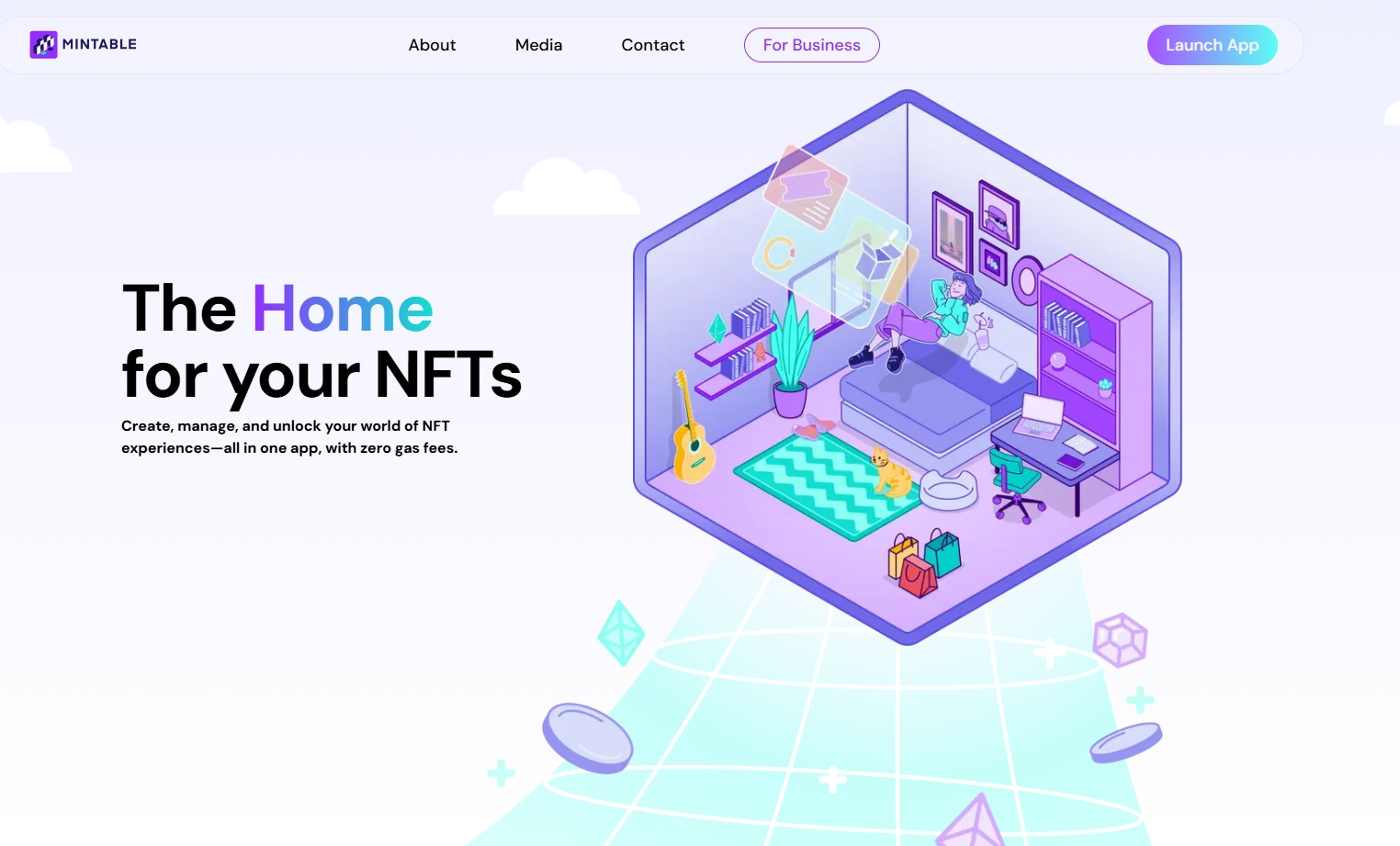
Create, manage, and unlock your world of NFT experiences - all in one app, with zero gas fees.

<figure><img src="https://2077242324-files.gitbook.io/~/files/v0/b/gitbook-x-prod.appspot.com/o/spaces%2FroeNMrosF7gYgIymjLYO%2Fuploads%2FDpTSnoaWFju3zsQWwtVo%2Fimage.png?alt=media&amp;token=99af548c-afe4-40c4-b312-fe0f0d1747cb" alt=""><figcaption></figcaption></figure>

Mintable.com is a unified platform where you can create, trade, and interact with digital assets on the blockchain. These digital items are universally referred to as NFTs or Non-Fungible Tokens. \
\
NFTs started out with a focus on art and collectibles, but today, businesses and independent creators are increasingly using them to create dynamic, interactive digital items. Popular use cases include memberships, game items, digital identities, access passes, and more. \
\
**Mintable is the home for your NFTs, and a gateway to the experiences they unlock.** With a focus on utility, Mintable facilitates interaction, engagement, and communication, all within a unified dashboard. It's powerful and easy to use, even if you are unfamiliar with the blockchain.&#x20;

For creators, Mintable has always been, and still is, the only place where you can mint NFTs on Ethereum without paying gas fees. &#x20;

**Whether you're coming to Mintable for work or for play, these docs are here to guide your way. Feel free to skip ahead to whichever guide is most relevant to you:**<br>

### 🏠 Jump right in to using Mintable.com

{% content-ref url="/pages/fPTe5uWoWA05xrp4Wh45" %}
[Get Started](/using-mintable/get-started)
{% endcontent-ref %}

### 🌏 Learn more about the Mintable ecosystem and our B2B solutions

{% content-ref url="/pages/z8CaiNqTMrYS4SBRHDbx" %}
[Mintable, The Ultimate NFT Ecosystem](/the-ecosystem/mintable-the-ultimate-nft-ecosystem)
{% endcontent-ref %}

Or simply go to the next page to learn all about NFTs and blockchain technology.


# What is ETH/Ethereum?

Ethereum is the largest blockchain in the world - an interconnected system for anyone to use globally.

### 🔍 Summary

At its core, **Ethereum is a distributed ledger** that uses blockchain to securely record transactions. Unlike traditional centralized systems, Ethereum introduces **smart contract** functionality — allowing developers to create applications with built-in, automated logic that executes in a **trustless, decentralized environment**.

***

### 🌍 Why Does Ethereum Matter?

Ethereum is important because it enables a **borderless digital economy**.

With nothing more than an internet connection, anyone in the world can:

* Access decentralized financial services (DeFi)
* Participate in blockchain-based games or communities
* Buy, sell, or create NFTs
* Use apps without relying on banks, governments, or third parties

> 🔒 Ethereum removes the need for middlemen — ensuring transactions are **secure**, **censorship-resistant**, and **verifiable** on-chain.

***

### ⚙️ What Are Smart Contracts?

Despite the name, **smart contracts** aren’t legal agreements — they’re **lines of code** stored on the blockchain.

* A smart contract **executes automatically** when pre-defined conditions are met
* It produces the **same result for everyone**, every time
* Think of it like a **vending machine**: insert a token, get a snack — no human approval needed

Smart contracts are what make **NFTs**, **DeFi**, and **DApps** possible.

***

### 🧱 What Are Decentralized Applications (DApps)?

**DApps** are blockchain-based applications that run on smart contracts. These can include:

* 🎮 Games
* 🖼️ Digital collectibles (like NFTs)
* 🗳️ Online voting systems
* 💸 Financial tools like lending, staking, and exchanges

Because Ethereum is **Turing-complete**, developers can build virtually **any kind of application** — limited only by their creativity and technical skills.


# What is an Ethereum Wallet - how do I get one?

A wallet holds your cryptocurrency and digital items (once made). Only you can access your wallet and its like you own bank account you control.

## What is a Wallet?

<figure><img src="https://2077242324-files.gitbook.io/~/files/v0/b/gitbook-x-prod.appspot.com/o/spaces%2FroeNMrosF7gYgIymjLYO%2Fuploads%2FcnWPFAjns01y0KGPxEzy%2Fimage.png?alt=media&amp;token=7b7ec7ad-c380-4bd2-b4eb-dd7d467d28df" alt=""><figcaption></figcaption></figure>

## 🔐 What Is a Wallet?

A **wallet** is your personal gateway to the Ethereum blockchain. It’s where you **store ETH (Ether)** — the cryptocurrency needed to interact with decentralized applications like Mintable.

You’ll need a wallet to:

* Hold your ETH
* Mint NFTs
* Buy or sell items
* Approve transactions securely

### 💡 Why Do I Need a Wallet?

Every transaction on Ethereum (minting, buying, selling, transferring NFTs) requires **ETH to pay gas fees**. Your wallet is what **submits these transactions** to the blockchain — and where you hold your funds and NFTs.

***

### 🔐 Are Wallets Secure?

Yes! Wallets are **self-custodial** — meaning **you’re the only one with access**.

* You must manually **approve or deny** every transaction
* Mintable **cannot make transactions on your behalf**
* This gives you full control over your digital assets

> 🔒 Always keep your wallet’s **private key or seed phrase** safe. Anyone with that info can access your wallet.

### 🧰 What Is the Mintable Wallet?

Every user who signs up on Mintable also gets a **free Mintable Wallet** — a custodial wallet powered by **MetaMask technology**.

* It lets you **receive NFTs**, including from gasless mints
* You can **take custody** of the wallet at any time and import it into MetaMask
* It’s ideal for onboarding users who don’t yet have their own wallet

🔗 Learn more: [What is the Mintable Custodial Wallet?](https://docs.mintable.app/using-mintable/nft-wallets/mintable-custodial-wallet)

***

### 🚀 Ready to Set Up a Wallet?

We recommend getting started with MetaMask:\
🔗 [Install MetaMask →](https://metamask.io)

Then connect it to Mintable and start collecting or creating NFTs right away!


# How do I get ETH?

Where do I buy ETH?

To mint, buy, or sell NFTs on Mintable (and interact with the Ethereum blockchain), you’ll need **ETH (Ether)** in your wallet. If you don’t have any yet, this guide will walk you through how to get started.

***

### 🧾 What Is ETH?

**ETH (Ether)** is the native cryptocurrency of the **Ethereum blockchain**. It powers all blockchain transactions, including minting and transferring NFTs. Without ETH, your wallet cannot submit blockchain transactions.

***

### 🛒 How to Buy ETH

The most common and beginner-friendly way to get ETH is by purchasing it through a **cryptocurrency exchange**. This process is safe, regulated, and typically completed in just a few steps.

***

### 🔄 Steps to Buy ETH via Exchange

#### 1. **Choose a Crypto Exchange**

There are many reputable exchanges that support ETH purchases. Choose one that:

* Operates in your country
* Accepts your local currency
* Has a good reputation and security record

#### 2. **Register an Account**

You’ll need to:

* Sign up with your email and a password
* Provide personal details for identity verification (KYC)
* Upload a **government-issued ID** and **proof of address** if required

This step ensures compliance with **KYC (Know Your Customer)** and **AML (Anti-Money Laundering)** regulations.

#### 3. **Deposit Funds**

Once your account is verified, deposit funds using methods such as:

* Bank transfer (wire, ACH, SEPA)
* Credit/debit card
* PayPal (on supported platforms)

> ⚠️ **Note:** Deposit fees and processing times vary by exchange and payment method. Check the exchange’s fee schedule for details.

#### 4. **Buy ETH**

After your funds have cleared:

* Go to the trading section of the exchange
* Select ETH/EUR, ETH/USD, or another currency pair
* Enter the amount you wish to buy
* Confirm your purchase

#### 5. **Withdraw ETH to Your Wallet**

Once purchased, **transfer your ETH to your wallet** (e.g., MetaMask or WalletConnect-compatible wallet) that you’ve connected to Mintable.

> 🔐 Storing ETH in your personal wallet gives you full control over your assets and is more secure than leaving it on an exchange.

### 🔗 Recommended Exchanges that Support ETH

Here are a few popular and widely-used exchanges that support ETH purchases:

| **Name**                              | **Country** | **Deposit Methods**                                         | **Minimum Purchase** |
| ------------------------------------- | ----------- | ----------------------------------------------------------- | -------------------- |
| [Bitfinex](https://www.bitfinex.com/) | Worldwide   | Bank wire transfer                                          | $10                  |
| [Bithumb](https://www.bithumb.com/)   | South Korea | Bank wire transfers, Credit and Debit cards, Gift cards     | N/A                  |
| [Binance](https://www.binance.com/)   | Worldwide   | Bank wire transfer                                          | $1                   |
| [Bitstamp](https://www.bitstamp.net/) | Worldwide   | Bank wire transfer, Credit and Debit cards                  | $5                   |
| [Kraken](https://www.kraken.com/)     | Worldwide   | Bank wire transfer                                          | $5                   |
| [Etoro](https://www.etoro.com/)       | Worldwide   | Bank wire transfer, Credit and Debit cards, PayPal payments | $200                 |
| [Coinbase](https://www.coinbase.com/) | Worldwide   | Bank wire transfer, Credit and Debit cards                  | $1                   |
| [BitPanda](https://www.bitpanda.com/) | Worldwide   | Bank wire transfer, Credit and Debit cards                  | $25                  |
| [Gemini](https://gemini.com/)         | Worldwide   | Bank wire transfer                                          | $1                   |


# Why is Ethereum Gas Fees so High?

If you've ever wondered why it costs so much to mint, transfer, or buy an NFT on Ethereum — you're not alone. Gas fees are a normal part of using the Ethereum blockchain, but they can fluctuate and become quite high depending on network activity.

***

### 🔍 What Are Gas Fees?

**Gas** is the unit of measurement for how much computational effort is required to execute operations on the Ethereum network.

When you:

* Mint an NFT
* Transfer tokens
* Interact with a smart contract
* Send ETH\
  ...you’re asking the Ethereum network to do some work.

That **work is paid for in ETH**, and the amount you pay is called the **gas fee**.

***

### 🧮 Why Do I Pay Gas Even If My Transaction Fails?

Even **failed transactions** consume computational resources. Ethereum validators (formerly miners) still need to process and attempt the transaction. That takes energy and time — so you're paying for the attempt, not just the success.

***

### 📈 Why Are Fees Sometimes So High?

Gas fees increase when the Ethereum network is **congested**. This happens when:

* Many users are trying to transact at once
* Popular NFT drops or DeFi events flood the network
* Bots and high-frequency traders are competing for block space

Ethereum works like an **auction** — the higher the gas you’re willing to pay, the more likely your transaction is to be processed quickly.

***

### 🛠️ Can I Reduce My Gas Fees?

Yes, but with tradeoffs.

You can adjust your **gas settings** manually in your wallet (e.g., MetaMask), choosing a lower gas fee to save money. However:

* **Lower gas = slower transaction**
* **Very low gas = transaction may fail**

Always check the **current gas price** before confirming.

***

### 🔗 Useful Tools for Tracking Gas Fees

* 📊 **Live Gas Price Tracker**\
  Monitor the average gas prices across different speeds:\
  👉 <https://etherscan.io/gastracker>

***

### 💡 Tip: Consider Gasless Minting

If you're looking to **avoid gas fees entirely**, check out [**Mintology's gasless minting**](https://mintology.app) – a solution that lets you mint real Ethereum NFTs without paying any gas at all.


# How do I speed up or cancel a pending transaction on Ethereum?

Sometimes, Ethereum transactions can get **stuck pending** — especially when gas fees are low or the network is congested. If you need to **speed up** or **cancel** a transaction, your wallet (e.g., MetaMask) can help — but timing is key.

***

### 🔁 Why Do Transactions Get Stuck?

Every Ethereum transaction must be confirmed by the network. If your **gas fee is too low**, your transaction may stay pending for a long time or get stuck behind others offering higher fees.

***

### ⚡ How to Speed Up a Transaction

You can **speed up** your pending transaction by submitting the same transaction again with a **higher gas fee**. This replaces the original and gets it processed faster.

***

### ❌ How to Cancel a Transaction

You may also choose to **cancel** the transaction entirely (if it hasn't already been picked up by the network). This replaces the pending transaction with a **zero-value transaction** that uses the same nonce.

***

### 📖 Follow This Step-by-Step MetaMask Guide

If you're using MetaMask, here's their official article that walks you through both options:

🔗 [MetaMask Guide: How to Speed Up or Cancel a Pending Transaction](https://support.metamask.io/manage-crypto/transactions/how-to-speed-up-or-cancel-a-pending-transaction/)

[<br>](https://docs.mintable.app/ethereum-version/basics/what-is-eth-ethereum/why-is-ethereum-gas-fees-so-high)


# What are NFTs (digital items)?

NFTs are non-fungible tokens (digital items) that live on the blockchain.

<figure><img src="https://2077242324-files.gitbook.io/~/files/v0/b/gitbook-x-prod.appspot.com/o/spaces%2FroeNMrosF7gYgIymjLYO%2Fuploads%2For8WEP5ElObD3v5YZvNj%2Fimage.png?alt=media&amp;token=c85d30b7-e0d9-41ea-9219-2246f73b6cca" alt=""><figcaption></figcaption></figure>

## 🎨 What Is a Non-Fungible Token (NFT)?

A **Non-Fungible Token (NFT)** is a **unique digital token** that exists on a blockchain like Ethereum. Unlike cryptocurrencies such as Bitcoin or Ether — which are *fungible* and identical to one another — each NFT is **one-of-a-kind** and contains **unique identifying information**.

This makes NFTs ideal for digital items that require **individual ownership, authenticity, and scarcity**.

***

### 🔁 Fungible vs. Non-Fungible: What's the Difference?

* **Fungible tokens** (like 1 ETH or 1 USD) are interchangeable — it doesn’t matter which one you have; they’re equal in value.
* **Non-fungible tokens** are **not interchangeable** — each has distinct value, purpose, and metadata.

#### 💡 Real-World Analogy:

* Two $1 bills can be swapped with no difference in value — this is fungibility.
* But you can’t trade a **baseball card** for someone’s **birth certificate** and call it even — both are unique. That’s non-fungibility.

***

### 🧩 Why Are NFTs Important?

NFTs enable **verifiable digital scarcity** — meaning a digital file can now be:

* **Owned** by a specific wallet
* **Proven authentic** via blockchain history
* **Traded or sold** just like physical goods

***

### 🎮 Popular Use Cases of NFTs

#### 1. **Gaming & Collectibles**

* NFTs can represent **in-game assets** that belong to the player, not the game studio.
* These assets can be transferred, traded, or even used across different games.

#### 2. **Digital Art**

* Artists use NFTs to sell original digital works with **proof of ownership**.
* NFTs prevent unauthorized duplication and help creators monetize their work directly.

#### 3. **Virtual Real Estate & Metaverse Items**

* Platforms like **Decentraland** allow users to own land, wearables, and avatars — all as NFTs.

#### 4. **Real-World Applications (Future Potential)**

* Imagine proving ownership of a luxury bag by scanning its NFT.
* Or replacing barcodes with NFTs that verify origin, authenticity, and ownership history.

> 🌐 The future of NFTs goes far beyond collectibles — from **supply chains** to **identity verification**, the possibilities are vast.

***

### 🛠️ Is an NFT the Same as an ERC-721?

Yes — on Ethereum, NFTs typically follow the **ERC-721 standard**, which defines how non-fungible tokens should behave.

* ERC-721 is the **most widely adopted NFT standard**
* Projects like **CryptoKitties**, **Decentraland**, and **Mintable** use it
* Mintable mints all NFTs as **ERC-721 tokens** on the Ethereum blockchain

> 🧠 ERC-721 ensures your NFT is compatible with wallets, marketplaces, and explorers across Ethereum.

***

### 🚀 The Rise of NFTs

NFTs first gained global attention with **CryptoKitties** in 2017 — a blockchain-based game where users collected and bred digital cats. The project raised over $12.5 million and temporarily clogged the Ethereum network due to demand.

Since then, NFTs have become central to the growth of:

* Digital art markets
* Metaverse economies
* Creator monetization tools
* Next-gen Web3 experiences

***

### 🌍 Are NFTs Just a Fad?

Far from it.

NFTs are poised to become the **next wave of blockchain adoption**, with applications limited only by the creativity of developers, artists, and businesses.

From collectibles to contracts, luxury goods to digital identities — NFTs have the potential to change the way we interact with **ownership, verification, and value** on the internet.

{% hint style="info" %}
Read more about NFTs in our [editorial NFT Basics series](https://editorial.mintable.app/category/guides/nft-basics/).
{% endhint %}


# Gasless Minting

Explaining the cost-free option on Mintable!

## **What is gasless minting?**

**Gasless minting** allows you to create an NFT on the Ethereum blockchain **without paying gas fees or submitting a blockchain transaction yourself.**

Instead of sending a transaction, you simply **sign a message** — and that’s it. Your item is minted, ready for sale, and fully on Ethereum mainnet.

> 🚀 This makes it easier than ever for new users to enter the NFT space — no ETH required, no wallet friction, no surprise fees.

### 🧠 How Does It Work?

When you use **gasless minting** on Mintable (powered by **Mintology**):

* You **sign a message** instead of submitting a blockchain transaction
* Your NFT is created and stored as a **real ERC-721 token** on Ethereum
* There is **no gas fee for the creator — ever**

> ⚠️ Since there’s no on-chain transfer yet, your NFT won’t show in your wallet right away — see below.

### 🔍 Why Doesn’t My NFT Appear in My Wallet?

Most wallets detect NFTs by watching for **Transfer events** on the blockchain.

Since gasless minting doesn’t emit a transfer event until the item is bought or manually transferred:

* The NFT **won’t show up in your wallet immediately**
* It **does exist** — you can see it on Mintable, and even on [Etherscan](https://etherscan.io)
* You can still **transfer it to yourself** to trigger a wallet-visible event, or manually add it

### ✅ Is It on Ethereum Mainnet?

**Yes!**\
Gasless minting is done directly on the **Ethereum mainnet**, not an L2 or sidechain.

Your NFTs are:

* Fully ERC-721 compliant
* Viewable and tradable on any platform that supports Ethereum NFTs
* As real as any other NFT — just minted smarter

## 📊 Fees Comparison Table

<table><thead><tr><th>Ethereum Chain</th><th></th><th></th><th></th><th></th><th data-hidden></th><th data-hidden></th></tr></thead><tbody><tr><td>Store Name</td><td>Mintable Gasless Store</td><td>Your own Mintology Store</td><td>Traditional Store</td><td>Traditional Minting</td><td></td><td></td></tr><tr><td>Fees</td><td>Free</td><td>Mintology Cost</td><td><ul><li>Gas for Store Creation</li><li>Gas Per Mint</li></ul></td><td><ul><li>Gas for Store Creation</li><li>Gas Per Mint </li></ul></td><td>Mintable Gasless Store</td><td></td></tr><tr><td>Batch Minting</td><td>No</td><td>No</td><td>Yes</td><td>No</td><td></td><td></td></tr><tr><td>Royalties from Secondary Sales</td><td>No</td><td>Customizable</td><td>Yes - adjusted to your preference</td><td>No</td><td></td><td></td></tr><tr><td>Mintable's Fees</td><td>2.5%</td><td>2.5% </td><td>Dependent</td><td>Dependent</td><td></td><td></td></tr></tbody></table>


# Mintable, The Ultimate NFT Ecosystem

Mintable is a comprehensive NFT ecosystem that streamlines the entire NFT lifecycle, from smart contract creation to user engagement and secondary market trading. The Mintable ecosystem consists of two key platforms:

### <img src="https://2077242324-files.gitbook.io/~/files/v0/b/gitbook-x-prod.appspot.com/o/spaces%2FroeNMrosF7gYgIymjLYO%2Fuploads%2F35d8D81jbdxTvDMwfB9M%2FMintable%20Logo_small.png?alt=media&amp;token=19b46cf8-ff73-423c-b614-8ffedc983ace" alt="" data-size="line">  Mintable.com

* Offers a centralized NFT dashboard with support for multiple wallets
* Enhances user experience with interactive NFT features
* Empowers independent creators with free NFT minting capabilities
* Hosts an open marketplace for NFT transactions

### <img src="https://2077242324-files.gitbook.io/~/files/v0/b/gitbook-x-prod.appspot.com/o/spaces%2FroeNMrosF7gYgIymjLYO%2Fuploads%2FITOEEWuBk9aEL7mamNpf%2Fmintology_logosmall.png?alt=media&amp;token=44594119-5329-47a7-84e7-f7789a9a1a9f" alt="" data-size="line">  Mintology.app

* Serves as Mintable's B2B solution
* Provides a robust NFT SaaS platform with over 75 APIs and development tools
* Enables the creation of sophisticated NFT applications
* Optimizes minting processes for enhanced efficiency

[Broken mention](broken://spaces/B2uBmpqYBMw3SiStwjtj)

\
Through these two powerful platforms, Mintable bridges the gap between individual creators and businesses, offering tailored solutions to meet diverse NFT requirements, and helping build holistic, well-integrated NFT solutions that users love. \ <br>


# Should I mint on Mintable or Mintology?

The Short Answer:  If you are new to Web3, Mintable is a great introduction to NFT creation. However, Mintology offers more powerful and flexible minting options. You should use Mintology if you are creating dynamic NFTs, utility NFTs, or any use case more complex than pure visual art.&#x20;

## <img src="https://2077242324-files.gitbook.io/~/files/v0/b/gitbook-x-prod.appspot.com/o/spaces%2FroeNMrosF7gYgIymjLYO%2Fuploads%2F35d8D81jbdxTvDMwfB9M%2FMintable%20Logo_small.png?alt=media&amp;token=19b46cf8-ff73-423c-b614-8ffedc983ace" alt="" data-size="line">  Mintable: Mint NFTs the Easy Way

On Mintable, we make it easy for creators to get started. \
\
Supported functionality:&#x20;

* Free, Gasless Minting on Ethereum
* Uploading one NFT at a time via a GUI
* Creating collections for NFTs
* Managing and customizing collection pages

If you're new to Web3, Mintable is a great way to get acquainted with the process of minting an NFT. It is extremely easy to use, and it is completely free! You don't even need a wallet or any crypto to start minting and selling your NFTs.&#x20;

## <img src="https://2077242324-files.gitbook.io/~/files/v0/b/gitbook-x-prod.appspot.com/o/spaces%2FroeNMrosF7gYgIymjLYO%2Fuploads%2FITOEEWuBk9aEL7mamNpf%2Fmintology_logosmall.png?alt=media&amp;token=44594119-5329-47a7-84e7-f7789a9a1a9f" alt="" data-size="line">  Mintology: Advanced NFT Solutions and APIs

Mintology extends Mintable’s capabilities, offering advanced services and comprehensive APIs that integrate NFTs seamlessly into any ecosystem. Here are some key features of Mintology:

1. **Smart Contract Generator:** Customize your own dedicated smart contract, loaded with our Gasless Minting technology. Set your royalty rates, total supply, and more. <br>

2. **API Suite:** Mintology's APIs offer fuss-free solutions for quickly integrating NFTs into any platform or application. The main features include:<br>

   * **Premint creation and management:** Allows you to bulk upload NFT images and metadata in advance, so they're all ready to go when your users start minting. <br>
   * **Token Gating:**  Manage access to exclusive content / experiences based on what NFTs users own, with filters for traits, quantities, token IDs, and more.<br>
   * **Custodial Wallets:** Your customer doesn't have a crypto wallet? No problem! Just mint to their email address instead, and Mintable will create one for them!<br>
   * **Metadata Updates:** The core of dynamic NFTs - create memberships, tickets, transforming artworks, stamp cards, game items, and more.

3. **Merchant App:** Mintology's solution to token-gating in the real world. Let your customers use their NFTs to redeem benefits in your physical store via a QR code scan that verifies their NFT and automatically updates metadata!

## **Mintology Until the Mint - Mintable for Everything After**

As we continue to upgrade Mintable.com, we will be adding new, interactive features that will help boost user engagement with the NFT projects created on Mintology. Our aim is to create an ecosystem where Mintable users and Mintology builders can provide real value for each other. \
\
In 2025, we will be improving on V3.0 of Mintable and adding new features that **no other marketplaces have, with the aim to help all our creators add interactivity to their NFTs with no code.**<br>


# Get Started

Ready to start your NFT journey? Setting up a Mintable account is quick and easy. Follow the steps below to create your profile and access your dashboard.

### ✅ Step 1: Visit the Mintable Website

1. Open your browser and go to:\
   👉 <https://mintable.app>
2. Click **"Launch App"** in the top right corner of the site\
   This will take you to the Mintable platform interface.

<figure><img src="https://2077242324-files.gitbook.io/~/files/v0/b/gitbook-x-prod.appspot.com/o/spaces%2FroeNMrosF7gYgIymjLYO%2Fuploads%2FDzwVUzElzlqk6TLvW7Wf%2Fimage.png?alt=media&amp;token=c4c7f6c2-4994-404f-b9c3-b469f23bc513" alt=""><figcaption></figcaption></figure>

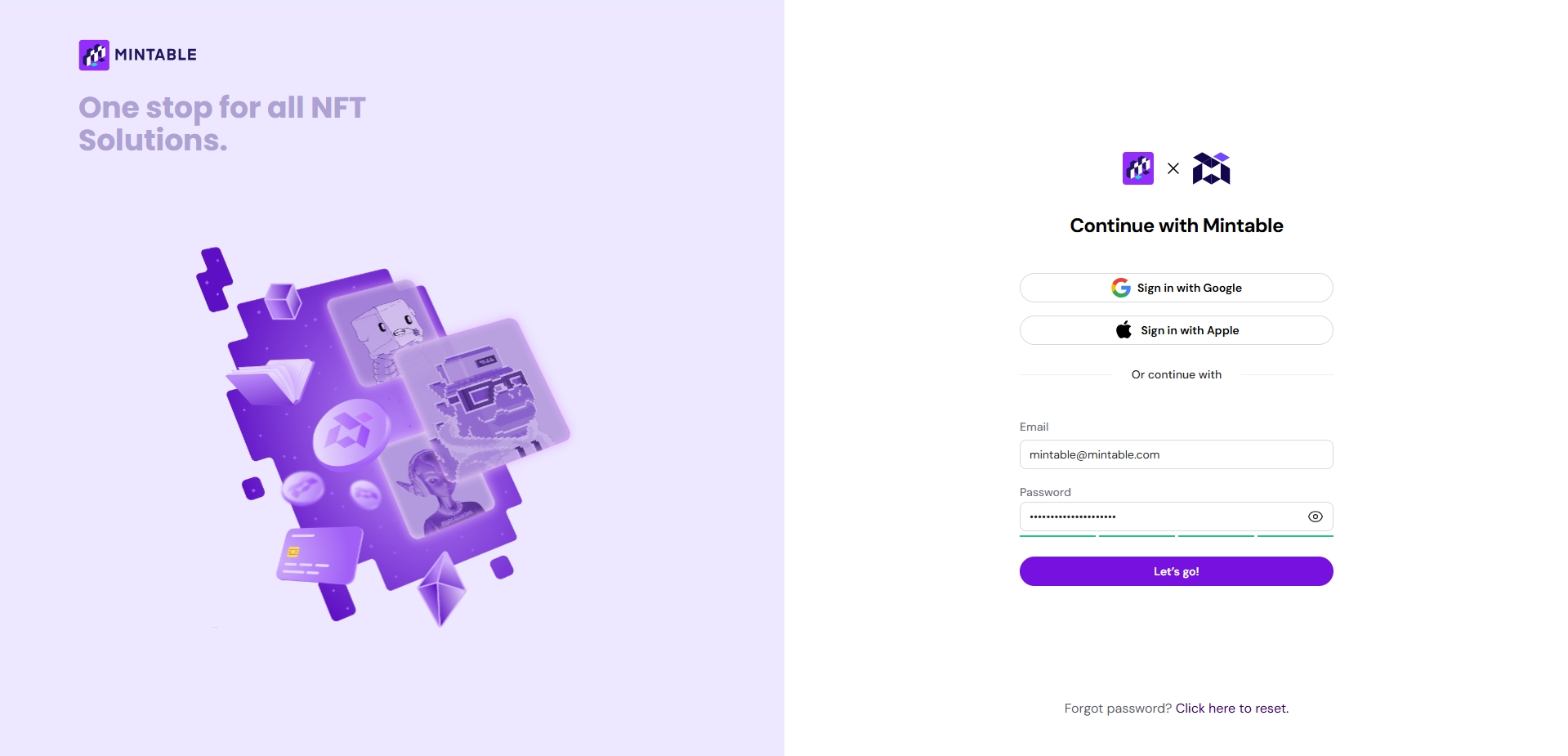
### ✉️ Step 2: Sign Up

1. Enter your:
   * **Email address**
   * **Desired username**
   * **Password** (make sure it meets the security requirements)

> 🔒 **Your password is never visible or stored by Mintable** — we use strong encryption to protect your information.

<figure><img src="https://2077242324-files.gitbook.io/~/files/v0/b/gitbook-x-prod.appspot.com/o/spaces%2FroeNMrosF7gYgIymjLYO%2Fuploads%2FJqRqvwDTiQ9BfT9xWkNb%2Fimage.png?alt=media&amp;token=18d87d36-0284-493b-be58-fbeb03c154b8" alt=""><figcaption></figcaption></figure>

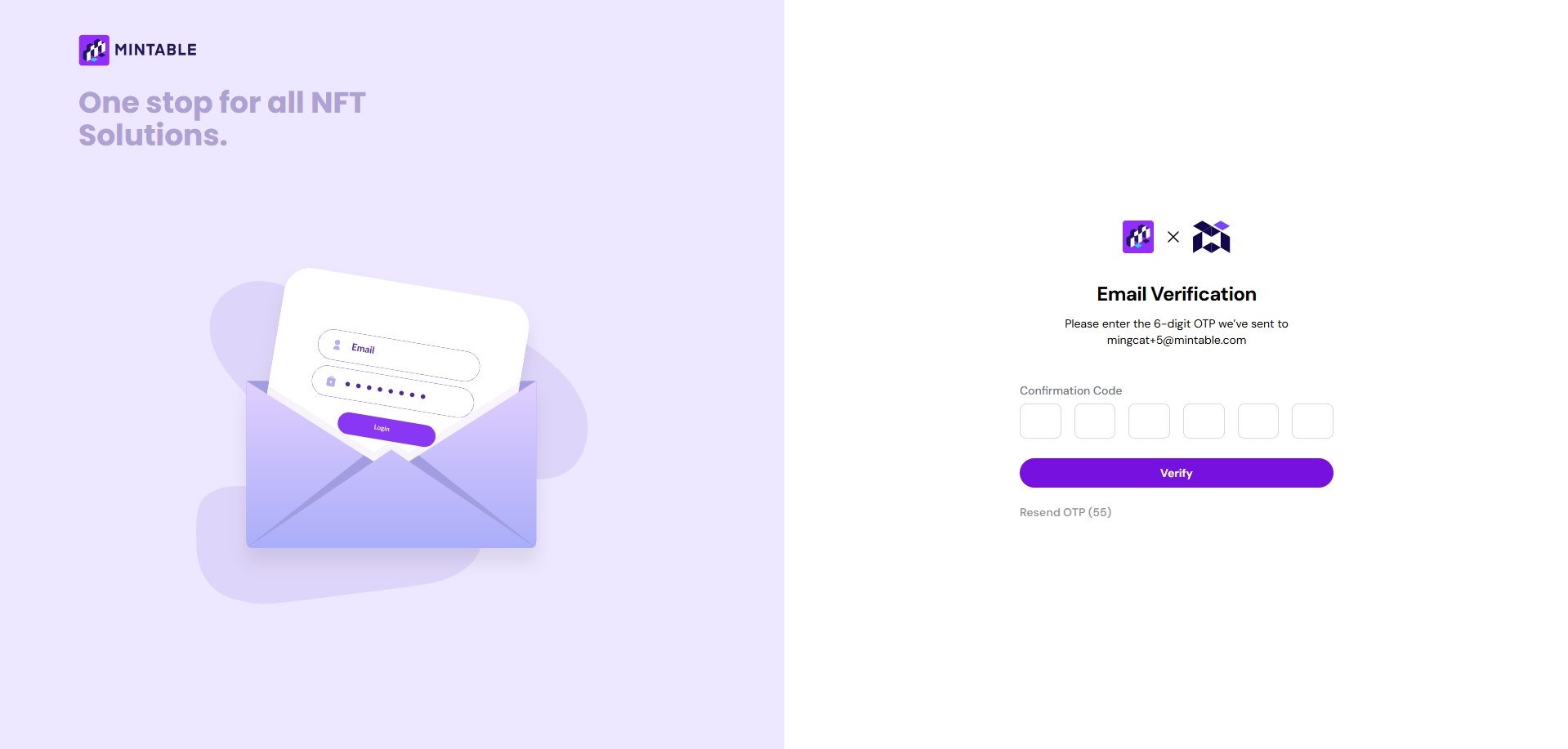
### 📩 Step 3: Verify Your Email

* After signing up, you’ll receive a **One-Time Passcode (OTP)** in your email.
* Enter the OTP on the website to complete your signup.

> 🕵️ **Don’t see the email?**\
> Check your spam, junk, or promotions folder — it usually arrives within a few seconds.

<figure><img src="https://2077242324-files.gitbook.io/~/files/v0/b/gitbook-x-prod.appspot.com/o/spaces%2FroeNMrosF7gYgIymjLYO%2Fuploads%2Fkte0sq2I9NkRW9M6F6jc%2Fimage.png?alt=media&amp;token=7ef03707-b24e-486b-81e7-5f324d1cb1d9" alt=""><figcaption></figcaption></figure>

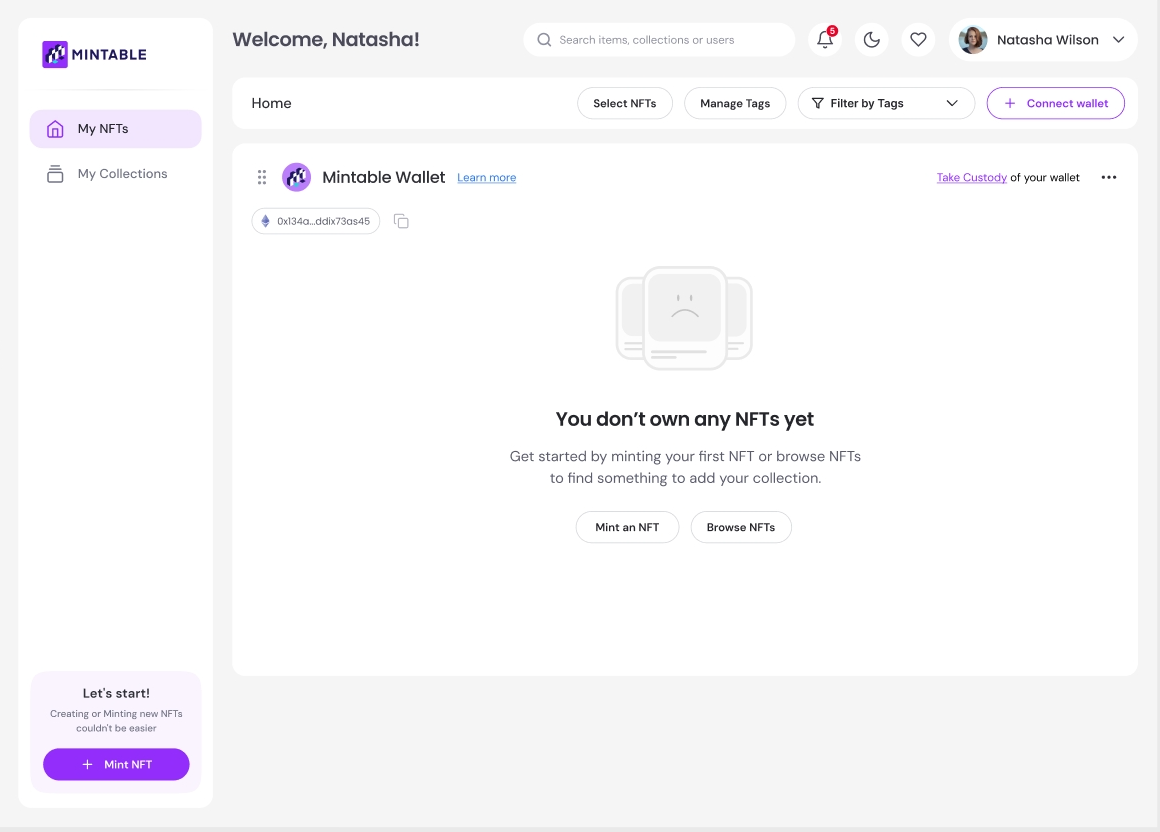
### 🖥️ Step 4: Welcome to Your Dashboard

Once you’ve verified your email, you’ll be taken to your **Mintable Dashboard**. From here, you can:

* View and manage your NFTs
* Connect multiple wallets
* Create collections
* Mint and list NFTs for sale
* Track your sales and purchases

<figure><img src="https://2077242324-files.gitbook.io/~/files/v0/b/gitbook-x-prod.appspot.com/o/spaces%2FroeNMrosF7gYgIymjLYO%2Fuploads%2FtcTdhbhbplaQILSgi1PL%2Fimage.png?alt=media&amp;token=12e02faf-402a-4640-9889-b4409c2d59d8" alt=""><figcaption></figcaption></figure>


# NFT Wallets


# Mintable Custodial Wallet

The Mintable Wallet is a free custodial NFT wallet automatically issued to every Mintable user. It’s designed to simplify onboarding, hold NFTs, and make it easier for both users and businesses to int

### 🧰 What Is a Custodial Wallet?

A **custodial wallet** is a wallet created and managed on your behalf. You don’t need to install extensions or manage private keys initially — Mintable takes care of the setup to provide a seamless entry point for new users.

***

### 📦 How the Mintable Wallet Works

* Your custodial wallet is created automatically when you sign up on Mintable.
* It can **receive and store NFTs**, including NFTs minted to your email via Mintology APIs.
* It also supports **auto-creation**: if an NFT is minted to an email (e.g. by a business using Mintology), a Mintable wallet and account are created automatically for that recipient.

> 📨 Users only need to **sign up using that same email** to access their NFT — no wallet setup required.

<figure><img src="https://2077242324-files.gitbook.io/~/files/v0/b/gitbook-x-prod.appspot.com/o/spaces%2FroeNMrosF7gYgIymjLYO%2Fuploads%2FtEEYkagOfBB5bfir9xG5%2Fimage.png?alt=media&amp;token=3971d0a9-c64e-4ef0-8ec1-704bf406709d" alt=""><figcaption></figcaption></figure>

Don't worry, any assets that you have in there, is not controlled by Mintable and you can take custody of this wallet any time!

{% hint style="warning" %}
If any money is deposited or sent to this wallet address, the wallet will be immediately frozen.\
You need to take custody of this wallet to gain access to your assets.
{% endhint %}

### 🛠️ Use Case: Business Onboarding With Mintology

Mintable’s custodial wallet feature is **ideal for brands** using **Mintology’s APIs** to mint NFTs to users who don’t yet have wallets.

#### Example:

1. A brand mints an NFT to a customer's **email** using Mintology
2. A Mintable account + custodial wallet is **automatically created**
3. The customer just signs up on Mintable with that same email to claim their NFT
4. No Web3 knowledge or crypto wallet setup needed


# Frozen Mintable Custodial Wallet!

Is your Mintable Wallet frozen? Find out why and how to un-freeze it.

<figure><img src="https://2077242324-files.gitbook.io/~/files/v0/b/gitbook-x-prod.appspot.com/o/spaces%2FroeNMrosF7gYgIymjLYO%2Fuploads%2FYWbVvUuIF1QuOnFIyDfL%2Fimage.png?alt=media&amp;token=aa0f8bc9-a057-4aa4-8ffb-90c0dc32f4f7" alt=""><figcaption></figcaption></figure>

If you've landed on a screen telling you your **Mintable Wallet is frozen**, don't worry — this is a **normal security measure** and means you're ready to take the next step in your Web3 journey.

Mintable’s custodial wallets are designed for ease and security — and sometimes that means temporarily freezing them to **protect your assets**.

### ❓Why Is My Wallet Frozen?

Your Mintable custodial wallet may be **automatically frozen** when one of the following happens:

| 🔍 Scenario                                        | 🔐 Reason                                                      |
| -------------------------------------------------- | -------------------------------------------------------------- |
| You **made a successful NFT sale**                 | ETH from the sale was deposited into your custodial wallet     |
| You **manually deposited ETH or tokens**           | Direct transfer triggers a freeze for security                 |
| Someone else **sent ETH or tokens** to your wallet | Incoming funds require you to take custody                     |
| You **attempted to take custody but failed**       | A failed ownership handover puts the wallet into locked status |

> 💡 In **all of these cases**, no one — including Mintable — can access the wallet or its contents until custody is properly transferred to **you**.

### 🔐 What Does "Frozen" Actually Mean?

When your wallet is frozen:

* **No one can access it**, not even Mintable staff
* The wallet becomes **locked** until custody is claimed
* All **NFTs and ETH inside remain safe** — but inactive
* This ensures **only the rightful owner** can gain access

### 🛡️ Why Mintable Freezes the Wallet

This feature is a **security-first design** to:

* Protect your NFTs and tokens from unauthorized access
* Ensure you are the **only person** who can take ownership
* Guide new users into full **Web3 self-custody** when real value is at stake

***

### 🧠 Reminder

* The **Mintable Wallet is custodial by default** (created automatically for new users)
* Once it holds funds, you’re required to **take full control**
* Until you do, **the wallet is locked for your protection**


# Claiming Mintable Custodial wallet

Taking custody of your Mintable wallet means you are **assuming full ownership** of your wallet and all assets within it — including NFTs, funds (ETH), and any store/smart contract addresses associated with it.

You’ll receive your **private key** (also known as a seed phrase), which you can then **import into MetaMask** to access your wallet directly.

### 🛠️ Why Take Custody?

* ✅ To unfreeze your wallet if it has received funds or an NFT sale
* ✅ To gain full access to your ETH and NFTs
* ✅ To take full ownership of the smart contract/store tied to your wallet
* ✅ To control your assets outside of Mintable’s custodial system

> 🔐 **Once you take custody, Mintable can no longer access your wallet. Your private key is deleted from our servers permanently.**

### 📍 Where to Start

#### Option 1: From “My NFTs”

1. Log in to your Mintable account
2. Go to **“My NFTs”**
3. Click **“Take Custody”** in the top right

<figure><img src="https://2077242324-files.gitbook.io/~/files/v0/b/gitbook-x-prod.appspot.com/o/spaces%2FroeNMrosF7gYgIymjLYO%2Fuploads%2Fl9fs89d5Driy3yjIi4xG%2Fimage.png?alt=media&amp;token=71b4b30e-0ed0-451f-a5af-3c98444bbf99" alt=""><figcaption></figcaption></figure>

#### Option 2: From the Wallet Freeze Prompt

If your wallet is frozen, you’ll see a **“Take custody of your wallet”** button under your wallet section — click it to begin.

<figure><img src="https://2077242324-files.gitbook.io/~/files/v0/b/gitbook-x-prod.appspot.com/o/spaces%2FroeNMrosF7gYgIymjLYO%2Fuploads%2FDQafvMqWF2NqVrfaiom4%2Fimage.png?alt=media&amp;token=3fc3c904-efeb-4f44-b79d-328bf356dbaa" alt=""><figcaption></figcaption></figure>

### 🧭 Step-by-Step: Taking Custody

#### 1. Do You Have a Crypto Wallet?

You’ll be asked if you already use a crypto wallet like **MetaMask**:

* If **yes**, proceed to the next step
* If **no**, you’ll be guided to install MetaMask before continuing\
  → 🔗 [Install MetaMask](https://metamask.io/)

<figure><img src="https://2077242324-files.gitbook.io/~/files/v0/b/gitbook-x-prod.appspot.com/o/spaces%2FroeNMrosF7gYgIymjLYO%2Fuploads%2Fz04xud55rVGXUJxEgwXm%2Fimage.png?alt=media&amp;token=747ceddd-1e1d-45e5-9b89-86e21a1aa734" alt=""><figcaption></figcaption></figure>

#### 2. Enter the OTP Sent to Your Email

{% hint style="danger" %}
To verify ownership, you’ll be sent a **One-Time Password (OTP)** to your registered email from:\
📧 `no-reply@mintable.com`

🚨 **Do not share this OTP with anyone.** Mintable staff will **never** ask you for your OTP or private key.
{% endhint %}

<figure><img src="https://2077242324-files.gitbook.io/~/files/v0/b/gitbook-x-prod.appspot.com/o/spaces%2FroeNMrosF7gYgIymjLYO%2Fuploads%2Fluh1RQJbXHu367NfG7yn%2Fimage.png?alt=media&amp;token=7621215f-09e8-4a3f-b745-cb2f798c89de" alt=""><figcaption></figcaption></figure>

#### 3. Copy Your Private Key

Once verified, you’ll be shown your **private key**. This is the **only way to access your wallet** once you take custody.

> ⚠️ **Anyone with this key can access your wallet and steal your assets. Treat it like a password — but even more securely.**

✅ **Best Practices**:

* Write it down on paper and store it in a secure place
* Do **not** copy/paste it into untrusted sites or cloud storage
* Avoid screenshots or email backups

> ⚠️ **If you lose this key, Mintable cannot recover your wallet or its contents.**

**Important:**\
If you **close your browser** or **lose internet** during this step, the wallet will freeze again. You’ll need to restart the process from the beginning.

#### 4. Import Your Wallet to MetaMask

After receiving your private key:

* Your Mintable wallet will be **removed from your dashboard**
* You must now **import it into MetaMask** to regain access

Follow these MetaMask steps:

1. Open MetaMask
2. Click on your account icon → **“Import Account”**
3. Paste the **private key**
4. Click **“Import”**

[🔗 View MetaMask’s Import Guide](https://support.metamask.io/start/how-to-import-an-account/)

<figure><img src="https://2077242324-files.gitbook.io/~/files/v0/b/gitbook-x-prod.appspot.com/o/spaces%2FroeNMrosF7gYgIymjLYO%2Fuploads%2FMwXJadN3pXnz8nOEsOXu%2FMetaMask_find_add_account_button_extension-64a1a766cff709e91d557721835f5960.gif?alt=media&amp;token=633979da-2dbf-4e82-9983-6705e165aa54" alt="" width="357"><figcaption></figcaption></figure>

<figure><img src="https://2077242324-files.gitbook.io/~/files/v0/b/gitbook-x-prod.appspot.com/o/spaces%2FroeNMrosF7gYgIymjLYO%2Fuploads%2FLM0ym0eQBp2csmLx83fN%2FMetaMask_import_account_from_private_key_extension-76adde8b986d50a6884764e6e9788ab3.gif?alt=media&amp;token=699f39f8-5957-493a-84c2-841e529340f3" alt="" width="357"><figcaption></figcaption></figure>

#### 5. Reconnect Your Wallet to Mintable

Once imported into MetaMask:

1. Go back to [Mintable](https://mintable.app)
2. Click **“Connect Wallet”**
3. Select your MetaMask wallet

> 🎉 Your NFT journey continues — now with full control of your assets!

### 🧼 What Happens Next?

* Your private key is **permanently deleted** from Mintable’s servers
* Only **you** can now access your wallet
* Mintable **cannot retrieve your wallet** or its contents if lost


# Connecting & Managing Multiple Wallets on Mintable

Mintable now supports **multiple wallet connections**, giving you full control over how you organize and manage your NFT collections. You can connect as many wallets as you prefer, switch between them for interactions, and customize how they appear in your dashboard.

### 🔌 Connecting Additional Wallets

You can connect any Ethereum-compatible wallet — not just your Mintable wallet.

#### To connect a new wallet:

1. Go to the **“My NFTs”** section
2. Click the **“Connect wallet”** button at the top right

<figure><img src="https://2077242324-files.gitbook.io/~/files/v0/b/gitbook-x-prod.appspot.com/o/spaces%2FroeNMrosF7gYgIymjLYO%2Fuploads%2F9eZK0iUETrrga5CaIVQs%2F2.png?alt=media&amp;token=817c3827-f568-4e93-b1b9-c2cba134ba04" alt=""><figcaption></figcaption></figure>

2. Choose the wallet you want to connect (e.g., MetaMask, WalletConnect)

<figure><img src="https://2077242324-files.gitbook.io/~/files/v0/b/gitbook-x-prod.appspot.com/o/spaces%2FroeNMrosF7gYgIymjLYO%2Fuploads%2FD4LuQckk8UxBuI4qgDEP%2Fimage.png?alt=media&amp;token=2e3ffdf2-6bc7-4c2b-86ea-166d1b4a9fcf" alt=""><figcaption></figcaption></figure>

2. Follow the on-screen instructions to approve the connection in your wallet extension
3. Ensure your wallet is set to the **Ethereum network**
4. Once connected, your wallet will appear in the list (at the bottom) with a default name like **“Wallet #x”**

> 🪙 All NFTs from the connected wallet will automatically show up on your Mintable dashboard.

<figure><img src="https://2077242324-files.gitbook.io/~/files/v0/b/gitbook-x-prod.appspot.com/o/spaces%2FroeNMrosF7gYgIymjLYO%2Fuploads%2FTOJn47hojwXjgY0IWsLR%2Fimage.png?alt=media&amp;token=1f407389-d332-4d8b-9012-5bee88af7b40" alt=""><figcaption></figcaption></figure>

{% hint style="info" %}
This will require signing on the wallet, so remember to enable your wallet extensions and ensure that the wallet is on Ethereum!&#x20;
{% endhint %}

### ✏️ Renaming Your Wallet

To help you stay organized, you can rename each wallet for easy reference.

#### How to rename a wallet:

1. Locate the wallet in your connected list
2. Click the **three dots icon (⋯)** on the right
3. Select **“Edit wallet name”**

<figure><img src="https://2077242324-files.gitbook.io/~/files/v0/b/gitbook-x-prod.appspot.com/o/spaces%2FroeNMrosF7gYgIymjLYO%2Fuploads%2FaE6ltBh4mBG3RguhBRDp%2Fimage.png?alt=media&amp;token=fa24ae42-bf55-4c2c-98c3-3be3499e4449" alt=""><figcaption></figcaption></figure>

4. Enter a custom name (e.g., “My Best Wallet”)
5. Click **“Save changes”**

<figure><img src="https://2077242324-files.gitbook.io/~/files/v0/b/gitbook-x-prod.appspot.com/o/spaces%2FroeNMrosF7gYgIymjLYO%2Fuploads%2FGtmgnTWldeqMFy4QqfaN%2Fimage.png?alt=media&amp;token=da0dea70-a3fe-4608-97f7-a261a2fa62f2" alt=""><figcaption></figcaption></figure>

Your wallet will now display with the new name you entered.

<figure><img src="https://2077242324-files.gitbook.io/~/files/v0/b/gitbook-x-prod.appspot.com/o/spaces%2FroeNMrosF7gYgIymjLYO%2Fuploads%2F0yx1ArZYMDLGL3l7eMnW%2Fimage.png?alt=media&amp;token=06a193b8-3c93-4241-9086-a3d8a66d0c3c" alt=""><figcaption></figcaption></figure>

### 📂 Rearranging Wallets

You can rearrange your connected wallets to match your preferred order.

#### Two ways to rearrange:

1. **Drag and Drop**

   Click and drag a wallet up or down the list to reposition it.

<figure><img src="https://2077242324-files.gitbook.io/~/files/v0/b/gitbook-x-prod.appspot.com/o/spaces%2FroeNMrosF7gYgIymjLYO%2Fuploads%2FleXPfyTOXP6VvM6CCnjq%2Fimage.png?alt=media&amp;token=295a4ee6-0398-4c1e-a83e-1c255354b276" alt=""><figcaption></figcaption></figure>

2. **Use Wallet Options**
   1. Click the **three dots (⋯)** on the wallet
   2. Choose from the available move options (e.g., “Move Up”, “Move Down”)

<figure><img src="https://2077242324-files.gitbook.io/~/files/v0/b/gitbook-x-prod.appspot.com/o/spaces%2FroeNMrosF7gYgIymjLYO%2Fuploads%2FOMqncOe2LpqN5rPstVTl%2Fimage.png?alt=media&amp;token=c50d5ed8-9cc4-43e3-a42e-c230ca5fa7d8" alt=""><figcaption></figcaption></figure>

### 📌 Tips

* You can connect as many Ethereum wallets as you like
* Each wallet can be renamed and rearranged individually
* All connected wallets are visible under “My NFTs,” and their NFTs will auto-sync to your Mintable dashboard
* To designate one wallet for all minting and transactions, you can [set it as your Default Wallet.](https://docs.mintable.app/using-mintable/nft-wallets/setting-a-default-wallet-on-mintable)


# What Crypto Wallets are supported by Mintable?

Crypto Wallets Supported by Mintable

## For best experience, we recommend using Mintable Wallet/ MetaMask.

[**Mintable Custodial Wallet**](https://mintable.com/) - A user-friendly wallet providing seamless access to the NFT world. Mintable enables users to collect, redeem, and sell NFTs effortlessly. Businesses can introduce NFTs to clients by minting directly to their email, creating an account and custodial wallet automatically. Enjoy full control over your assets and practice minting and listing NFTs with ease. Explore the Mintable Custodial Wallet to get started in minutes!

[**MetaMask**](https://metamask.io/) – A browser extension with peerless power and flexibility. MetaMask is Web3’s most popular wallet and one of the oldest players in the industry. Check out the [MetaMask Introductory Video](https://www.youtube.com/watch?v=ZIGUC9JAAw8\&feature=youtu.be) to get it set up and ready to go in minutes!

[**Phantom**](https://phantom.app/) - A browser extension with exceptional ease and functionality. Phantom is Solana’s go-to wallet and a standout choice for users in the ecosystem. Read about the [Phantom wallet](https://phantom.app/learn/guides/how-to-create-a-new-wallet) to get it set up and ready to go in minutes!

[**WalletConnect**](https://walletconnect.com/) - A versatile bridge with seamless integration capabilities. WalletConnect supports a wide range of wallets and dApps, offering unmatched compatibility and ease of use. Read the [WalletConnect Documentation](https://docs.walletconnect.com/) to get it set up and ready to go in minutes!

[**Coinbase**](https://www.coinbase.com/wallet) - A robust app with extensive features and security. Coinbase Wallet is a trusted name in the crypto industry, providing a comprehensive solution for managing digital assets and accessing dApps. Read the [Coinbase Wallet Guide](https://www.coinbase.com/en-sg/wallet/articles/getting-started-extension) to get it set up and ready to go in minutes!


# Removing wallets

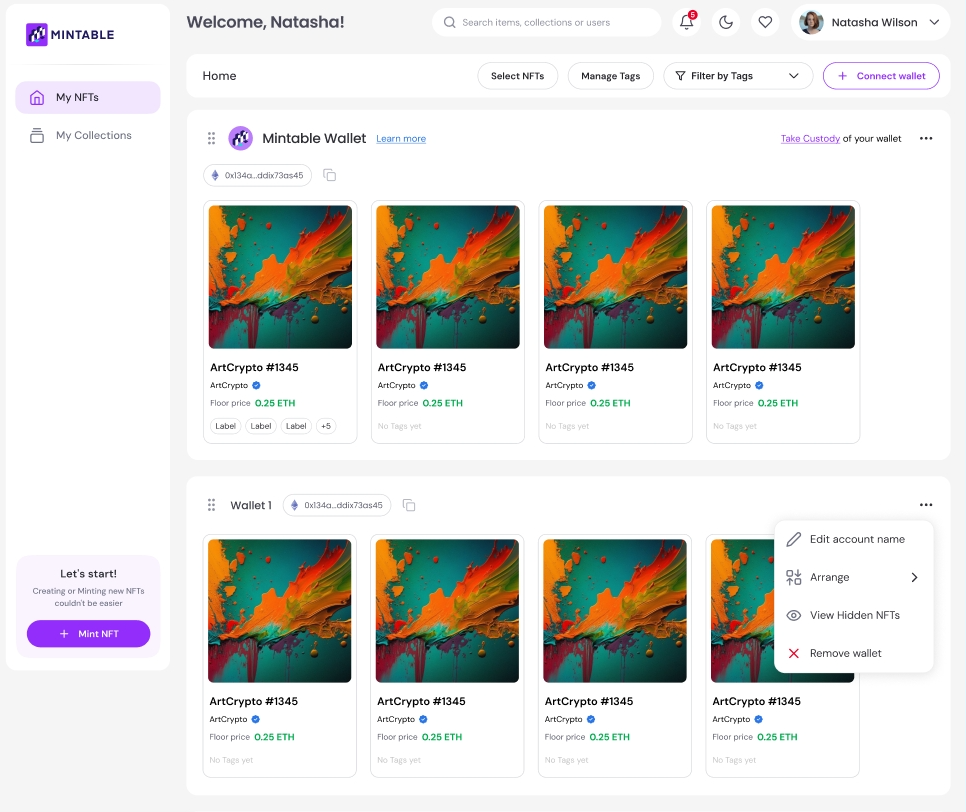
Having too many wallets may be confusing, so you can now easily remove them to consolidate your dashboard.

To remove the wallet, click on the 3 dots to the right of the wallet and choose "Remove wallet"

<figure><img src="https://2077242324-files.gitbook.io/~/files/v0/b/gitbook-x-prod.appspot.com/o/spaces%2FroeNMrosF7gYgIymjLYO%2Fuploads%2Fj5vS1gxH3qO7jMW8Cafu%2Fimage.png?alt=media&amp;token=2a092d1e-0707-4b45-b0f7-b303a8be5a65" alt=""><figcaption></figcaption></figure>

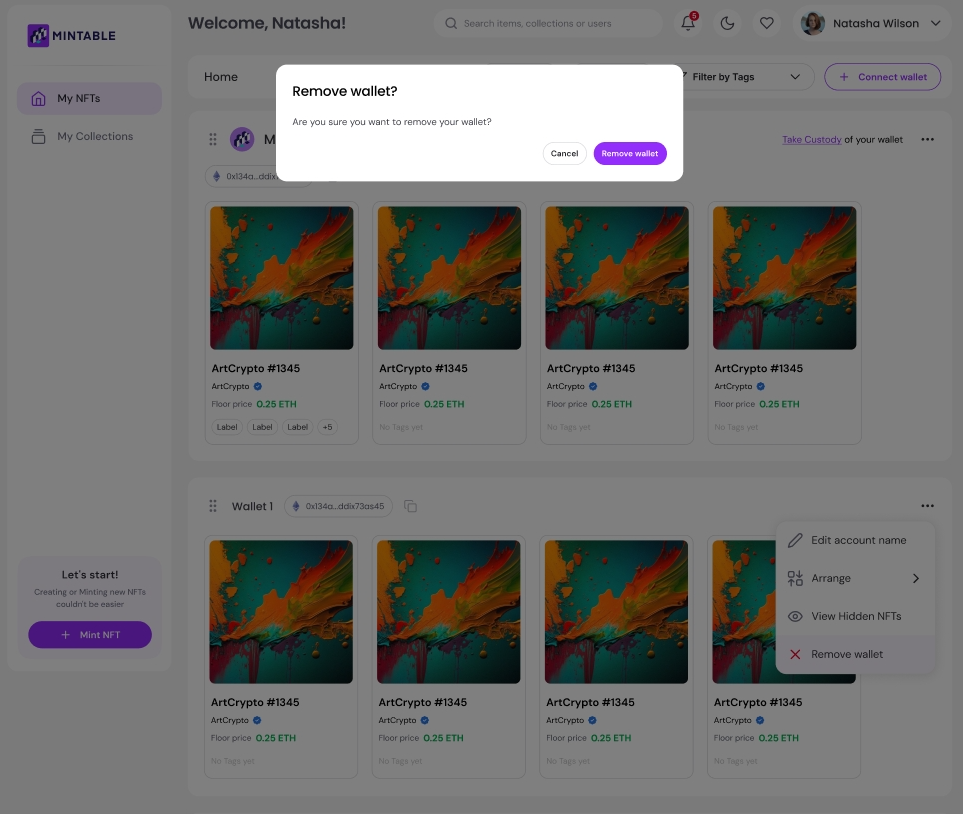
If you are sure, choose to "Remove wallet" in the next prompt. In this example, I am sure to remove "Wallet 1".

<figure><img src="https://2077242324-files.gitbook.io/~/files/v0/b/gitbook-x-prod.appspot.com/o/spaces%2FroeNMrosF7gYgIymjLYO%2Fuploads%2FmR37dPhSXlx8qNEGpWdG%2Fimage.png?alt=media&amp;token=23eab199-4caf-4eae-b849-03f44528a22b" alt=""><figcaption></figcaption></figure>

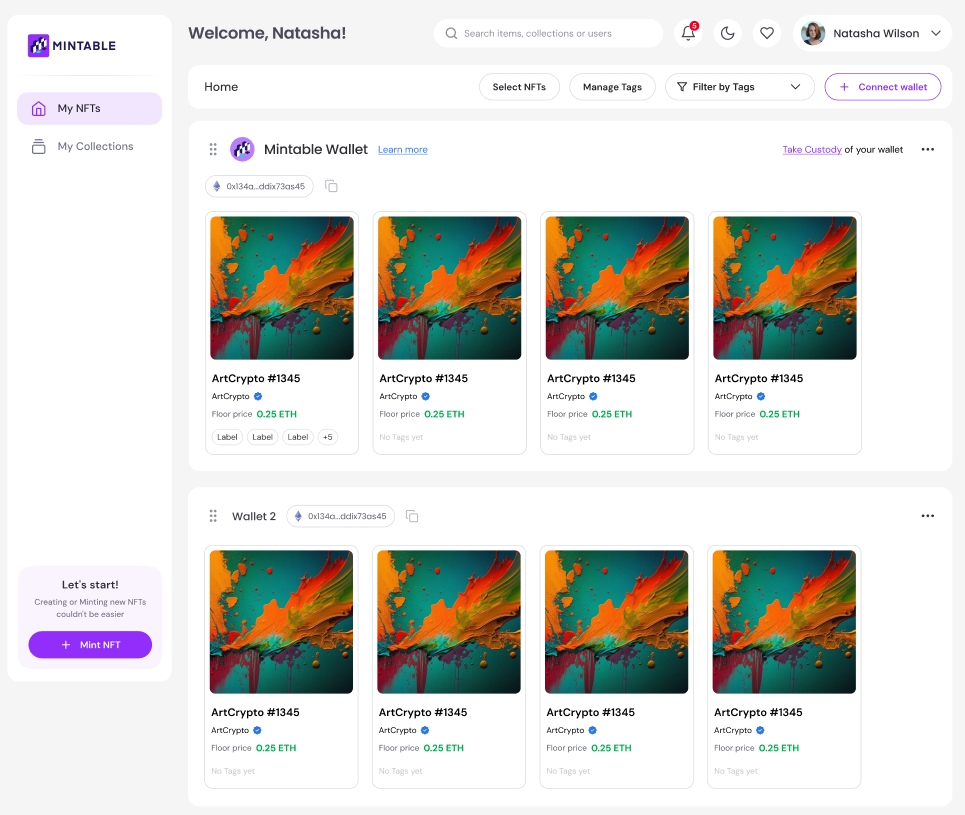
Your wallet will then be removed from the dashboard, as shown below. You can always reconnect the wallet if you prefer!

<figure><img src="https://2077242324-files.gitbook.io/~/files/v0/b/gitbook-x-prod.appspot.com/o/spaces%2FroeNMrosF7gYgIymjLYO%2Fuploads%2FiMTeDzDOR2eTHkPijpw7%2Fimage.png?alt=media&amp;token=8adf5726-13e5-464e-92a2-df151a3f2ce1" alt=""><figcaption></figcaption></figure>


# Setting a Default Wallet on Mintable

To simplify your NFT activities, you can set one wallet as your default — this wallet will be used for minting, buying, and selling NFTs unless you manually select a different one during a transaction

✅ What Is a Default Wallet?

Your **default wallet** is the wallet Mintable will use by default for all platform interactions, including:

* Minting new NFTs
* Listing NFTs for sale
* Purchasing NFTs from the marketplace

You can change your default wallet at any time through your wallet settings.

***

### 📝 How to Set a Wallet as Default

1. Navigate to the **Wallets** section in your Mintable account
2. Scroll to your list of connected wallets
3. Locate the wallet you’d like to set as your default
4. Click the **three dots icon (⋯)** on the right side of the wallet
5. Select **“Make this default wallet”** from the dropdown menu

<figure><img src="https://2077242324-files.gitbook.io/~/files/v0/b/gitbook-x-prod.appspot.com/o/spaces%2FroeNMrosF7gYgIymjLYO%2Fuploads%2FPtIig5oAPV1qVr5LBluq%2FCh%C6%B0a%20co%CC%81%20t%C3%AAn.png?alt=media&amp;token=60c6cb2a-69c1-4e17-bbac-6629ed592192" alt=""><figcaption></figcaption></figure>

Your default wallet is now set.

> 💡 The default wallet is visually marked, making it easy to identify in your wallet list.


# Linking your Metamask - Mobile Version

Want to access Mintable on your phone using MetaMask? Follow this quick guide to get started using the MetaMask mobile app with Mintable — no desktop needed!

### ✅ Step-by-Step: Connecting MetaMask Mobile to Mintable

#### 🔽 Step 1: Download MetaMask Mobile

1. Head over to the official MetaMask site:\
   👉 <https://metamask.io>
2. Download the **MetaMask mobile app** for iOS or Android
3. Set up your wallet or import your existing wallet using your seed phrase

#### 🌐 Step 2: Open the Built-In MetaMask Browser

1. Open the **MetaMask app**
2. Tap the **Browser icon**

![](https://2077242324-files.gitbook.io/~/files/v0/b/gitbook-x-prod.appspot.com/o/spaces%2FroeNMrosF7gYgIymjLYO%2Fuploads%2FZgovMzrge5tWUVNs5TMD%2FIMG_2823.png?alt=media\&token=4dcc6a0f-caa5-4e04-a11e-9ff75d4e107b)

#### 🔎 Step 3: Navigate to Mintable

1. In the MetaMask browser, open a **new tab**
2. Enter the address:\
   👉 **mintable.com**
3. Wait for the Mintable site to fully load

<figure><img src="https://2077242324-files.gitbook.io/~/files/v0/b/gitbook-x-prod.appspot.com/o/spaces%2FroeNMrosF7gYgIymjLYO%2Fuploads%2FxsOTQeQNRA0vTo4cQ99a%2FWhatsApp%20Image%202025-05-14%20at%2014.31.12.jpeg?alt=media&amp;token=c8ce5b20-1fb4-474d-99f1-3c4612892a46" alt=""><figcaption></figcaption></figure>

#### 👤 Step 4: Log In or Sign Up

1. Tap the **menu icon (☰)** on the Mintable site
2. Choose **"Sign Up"** or **"Log In"**
3. Enter your email and password (or register a new account)

<figure><img src="https://2077242324-files.gitbook.io/~/files/v0/b/gitbook-x-prod.appspot.com/o/spaces%2FroeNMrosF7gYgIymjLYO%2Fuploads%2Fu0TlYwDevkjGQb39FsNK%2FWhatsApp%20Image%202025-05-14%20at%2014.31.13.jpeg?alt=media&amp;token=b7db4d45-4ba2-4466-9e9d-d969a1b4eaf9" alt=""><figcaption></figcaption></figure>

#### 🔗 Step 5: Your Wallet Will Auto-Link

Once you’re logged in, Mintable will **automatically detect your MetaMask wallet** and connect it for use.

🧠 You can now mint NFTs, buy items, or manage your collections — all from your mobile device!


# Your Profile


# Edit my profile/Account settings

Want to personalize your profile or manage your account details? Mintable makes it easy to customize your public-facing page and control your account preferences — all in one place.

### ✨ Profile Customization

To access your profile settings:

1. Log in to your Mintable account
2. Click on your **profile icon** in the top-right corner
3. Select **“Profile Settings”**

#### From here, you can:

* **Upload a profile picture**
* **Add a banner**
  * 🖼️ **Recommended size**: 1440px x 260px
* **Update your description**
* **Add your social media links** (Twitter, Instagram, website, etc.)

<figure><img src="https://2077242324-files.gitbook.io/~/files/v0/b/gitbook-x-prod.appspot.com/o/spaces%2FroeNMrosF7gYgIymjLYO%2Fuploads%2FwWCIUkRwlnknTl9tOujb%2Fimage.png?alt=media&amp;token=ba44879b-2c1e-462c-b842-c47587d4020f" alt=""><figcaption></figcaption></figure>

### 👀 Previewing Changes

You can click **“Preview Profile”** at any time to see how your changes will appear to others — before saving them.

When you’re satisfied, click **“Save”** to confirm your updates.

<figure><img src="https://2077242324-files.gitbook.io/~/files/v0/b/gitbook-x-prod.appspot.com/o/spaces%2FroeNMrosF7gYgIymjLYO%2Fuploads%2FEoVrxFuRjRXDYt5LKkoT%2Fimage.png?alt=media&amp;token=7568707f-5e0c-4977-9a7b-f5df071bff22" alt=""><figcaption></figcaption></figure>

### ⚙️ Account Settings

To access **account-level settings**, click on **“Account Settings”** from your profile menu.

Here you can:

* **Edit your email subscription preferences**
* **Change your email or password**
* **Delete your Mintable account** (⚠️ irreversible)

<figure><img src="https://2077242324-files.gitbook.io/~/files/v0/b/gitbook-x-prod.appspot.com/o/spaces%2FroeNMrosF7gYgIymjLYO%2Fuploads%2F2PCQWeHZO1gohINx39PV%2Fimage.png?alt=media&amp;token=4438891b-432f-43a4-9a85-82c872131f61" alt=""><figcaption></figcaption></figure>


# Searching on Mintable

Mintable makes it easy to search for specific NFTs and authentic stores using blockchain identifiers like token IDs and smart contract addresses.

### 🔍 Searching for a Specific NFT

If you know the **Token ID** of an NFT:

1. Go to the Mintable [search bar](https://mintable.app)
2. Paste or enter the **Token ID**
3. The system will locate and take you **directly to the NFT** that matches the ID

> ✅ This is ideal when tracking a known item or verifying ownership details.

***

### 🏪 Searching for a Specific Store

You can also search by **smart contract address** to find authentic NFT stores on the blockchain.

#### To do this:

1. Copy the **smart contract address** of the store
2. Paste it into the Mintable search bar
3. Select the matching store result

> 🛡️ **Tip:** Searching by contract address is the **most reliable method** to ensure you're navigating to the **authentic store** — especially for high-value or well-known collections.

***

### ⚠️ Double Check the Deployer

Even when using a smart contract, we recommend verifying:

* The **wallet address that deployed the contract**
* Whether that address matches the project’s **official website or social profiles**

> This helps protect you from impersonator or scam collections.

&#x20;


# Search with AI

Mintable now offers **AI-powered NFT browsing and management**. With our advanced AI integration, you can simply type what you want to do, and the platform will respond intelligently — helping you browse, list, or sell NFTs with ease.

No need to manually search or navigate through menus — just **use natural language prompts**, and Mintable’s AI will take care of the rest.

***

### 🛒 Buying NFTs

To **find and purchase NFTs**, use simple prompts such as:

👉 **“I want to buy a Pudgy Penguin NFT”**

👉 **“Show me Cool Cats for sale”**

The AI will display all relevant NFTs that are **currently listed for sale**, based on your request.

***

### 🏷️ Selling NFTs

To **list your NFTs for sale**, try prompts like:

👉 **“I want to sell a Pudgy Penguin NFT”**

👉 **“List my DeadFellaz NFT”**

This will pull up your owned NFTs that match the prompt and allow you to quickly list them on the marketplace.

***

### 📦 Viewing Owned & Related NFTs

You can also use prompts to **view your collection** and see similar NFTs in one place. Use prompts like:

👉 **“Pudgy Penguins”**

This will return:

1. Your **owned Pudgy Penguin NFTs**
2. **Pudgy Penguin NFTs currently listed for sale**
3. Other **related or unlisted NFTs**

> 🧠 The AI understands NFT project names, categories, and collection metadata — so even vague prompts will still produce smart results.

***

### 🔍 Tips for Using Prompts

| Prompt Style                       | Result                                      |
| ---------------------------------- | ------------------------------------------- |
| “I want to buy \[Collection Name]” | Lists NFTs for sale from that collection    |
| “I want to sell \[NFT Name]”       | Lists your matching NFTs ready to sell      |
| “\[Collection Name]”               | Shows owned, listed, and other related NFTs |

You can also use conversational language — the AI is built to understand intent!

***

### 💬 Examples

* “Show me Azuki NFTs for sale”
* “List my Bored Ape”
* “Do I own any Moonbirds?”
* “Sell my World of Women NFT”


# What is a "Guaranteed Authentic" collection?

<figure><img src="https://docs.mintable.app/~gitbook/image?url=https%3A%2F%2F4070683621-files.gitbook.io%2F%7E%2Ffiles%2Fv0%2Fb%2Fgitbook-x-prod.appspot.com%2Fo%2Fspaces%252F-MBMfw1KGuBM0Z3DpPUt%252Fuploads%252FAT5dbt2gBgmevGsy9fS5%252FguaranteedAuthentic_1.PNG%3Falt%3Dmedia%26token%3D06db0933-0e3b-4d91-998d-d6c205d0e3bb&#x26;width=768&#x26;dpr=4&#x26;quality=100&#x26;sign=8e72b503&#x26;sv=1" alt=""><figcaption></figcaption></figure>

On Mintable, a **“Guaranteed Authentic”** label signals that a collection has passed our internal verification process and meets key criteria for legitimacy. However, like all things in Web3, **we strongly encourage users to do their own research (DYOR)** before making purchases.

> 🔒 Verification increases buyer confidence — but it doesn’t guarantee absolute safety. Please always DYOR.

### 🔍 How Does Mintable Determine If a Collection Is Authentic?

Verification is handled **at Mintable’s discretion**, using a combination of:

* ✅ Cross-referencing **official websites and social media accounts**
* ✅ Verifying the collection’s **smart contract** on the blockchain
* ✅ Reviewing the setup on Mintable (logo, banner, links, etc.)

Our team checks these elements carefully to confirm the collection's authenticity and ownership.

***

### 📋 Eligibility Criteria

Your collection may be eligible for “Guaranteed Authentic” status if it meets the following criteria:

| Criteria                  | Description                                                                                                                                            |
| ------------------------- | ------------------------------------------------------------------------------------------------------------------------------------------------------ |
| 🔁 **Trading Volume**     | At least **100 ETH** in secondary market volume                                                                                                        |
| 🌐 **Community Strength** | <p>Active community with one or more of the following:<br>– 5,000+ Discord members<br>– 20,000+ Twitter followers<br>– 50,000+ Instagram followers</p> |
| 📜 **Smart Contract**     | Must be a **verified contract** on [Etherscan](https://etherscan.io)                                                                                   |

Meeting these does not **guarantee** verification, but it increases your eligibility for review.

***

### ✉️ How to Request Verification

If your collection meets the criteria, you can request verification through the following methods:

1. **Tag us on Twitter or Instagram**
   * Make a post and mention **@mintable\_app**
   * Request verification for your collection
   * Our team will reach out to verify details
2. **Contact us on Discord**
   * Post in support channels
   * Share your project info and smart contract address

Be sure to include the following details:

* Your **Mintable username & email**
* **Wallet address**
* **Smart contract address** of the collection
* Links to official **website and social media**
* Screenshots or metrics if helpful

***

### 📣 Reminder

A “Guaranteed Authentic” label **does not eliminate risk**. Always double-check project details, contract addresses, and ownership history before making a purchase.

> 🧠 When in doubt, always **DYOR** — *Do Your Own Research.*


# Buying and Selling NFTs

Buy it, hodl it, redeem it, trade it, download it.

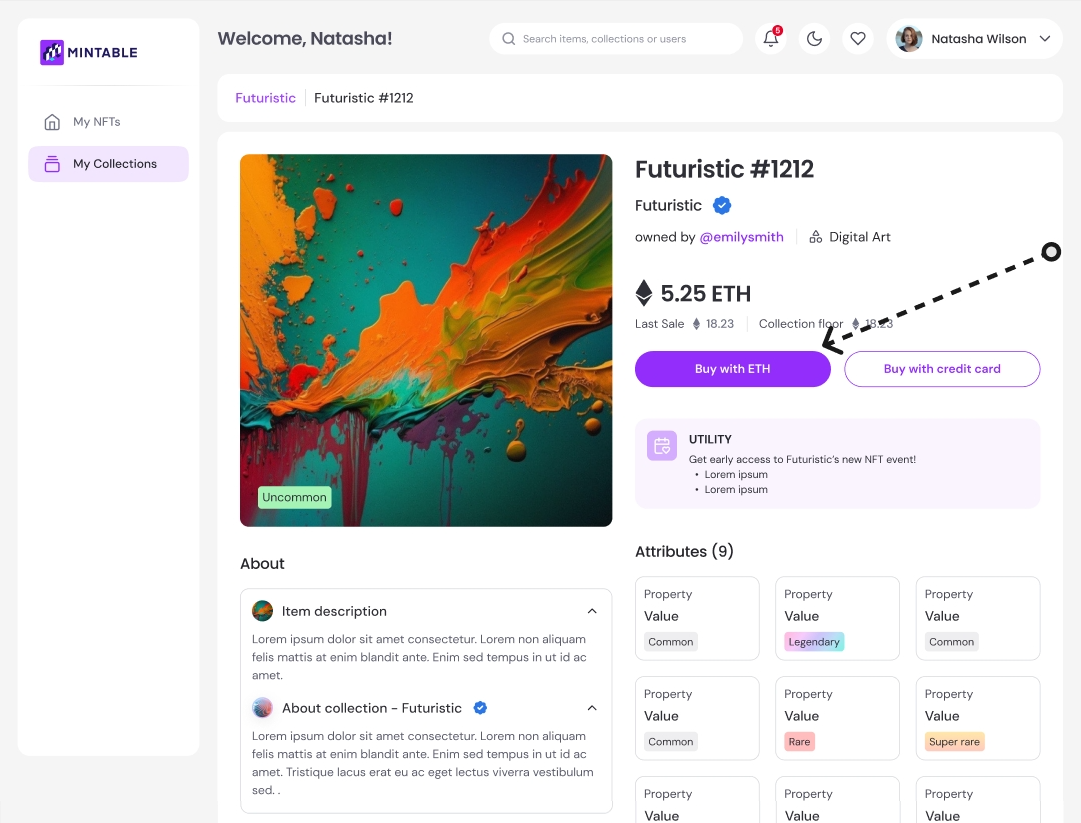
Buying an NFT on Mintable is simple and takes just a few minutes! Whether you’re using **ETH** or a **credit card**, here’s how to complete your purchase and get your NFT delivered to your wallet.

### ✅ Step-by-Step: Buying an NFT

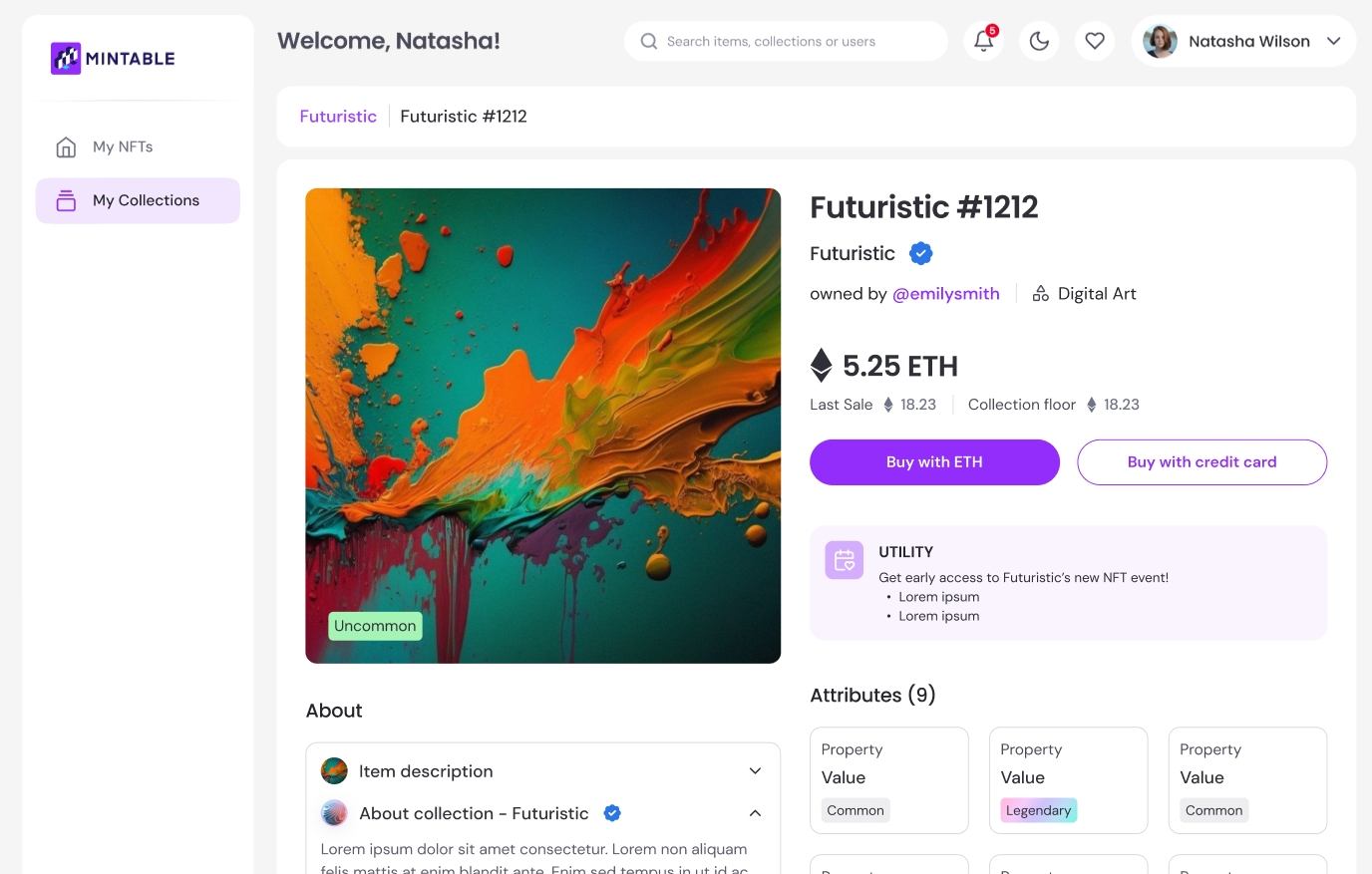
#### 1. Find an NFT You Like

Browse the [Mintable marketplace](https://marketplace.mintable.com/welcome) or search for a specific collection.\
Click on the NFT to open the **item page**.

<figure><img src="https://2077242324-files.gitbook.io/~/files/v0/b/gitbook-x-prod.appspot.com/o/spaces%2FroeNMrosF7gYgIymjLYO%2Fuploads%2FBcMqrzxwrL0iUMarU2uJ%2Fimage.png?alt=media&amp;token=c9190275-a4cf-4ff1-ba07-faa9d555e6e1" alt=""><figcaption></figcaption></figure>

or from the item page:

<figure><img src="https://2077242324-files.gitbook.io/~/files/v0/b/gitbook-x-prod.appspot.com/o/spaces%2FroeNMrosF7gYgIymjLYO%2Fuploads%2Fdtjl8U21xGsx8y7T7tug%2Fimage.png?alt=media&amp;token=7238fc9d-1af1-47e7-8bc0-a791362a6362" alt=""><figcaption></figcaption></figure>

#### 2. Click "Buy Now"

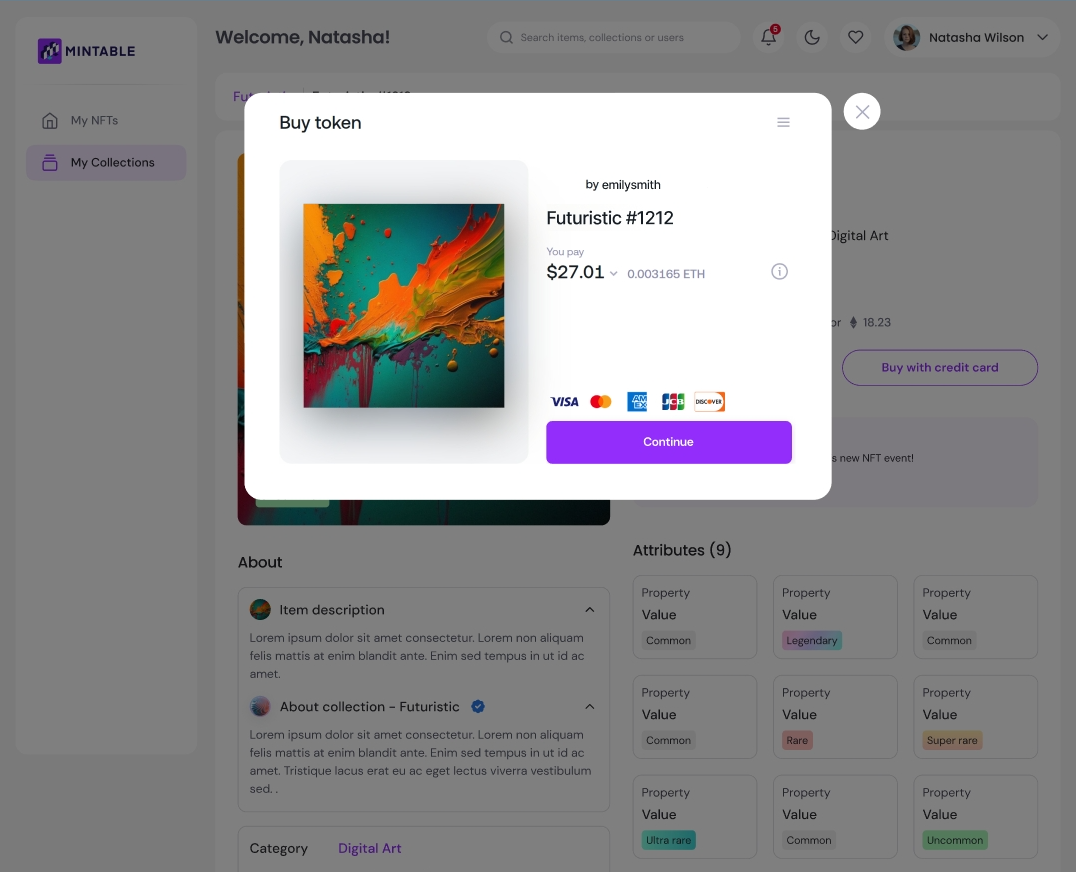
You’ll see payment options for:

* 💰 **ETH (Ethereum)**
* 💳 **Credit Card**

{% hint style="danger" %}
&#x20;**Important:** You **must have a connected Ethereum wallet** to purchase an NFT, even with a credit card.
{% endhint %}

### 💸 Buying with ETH

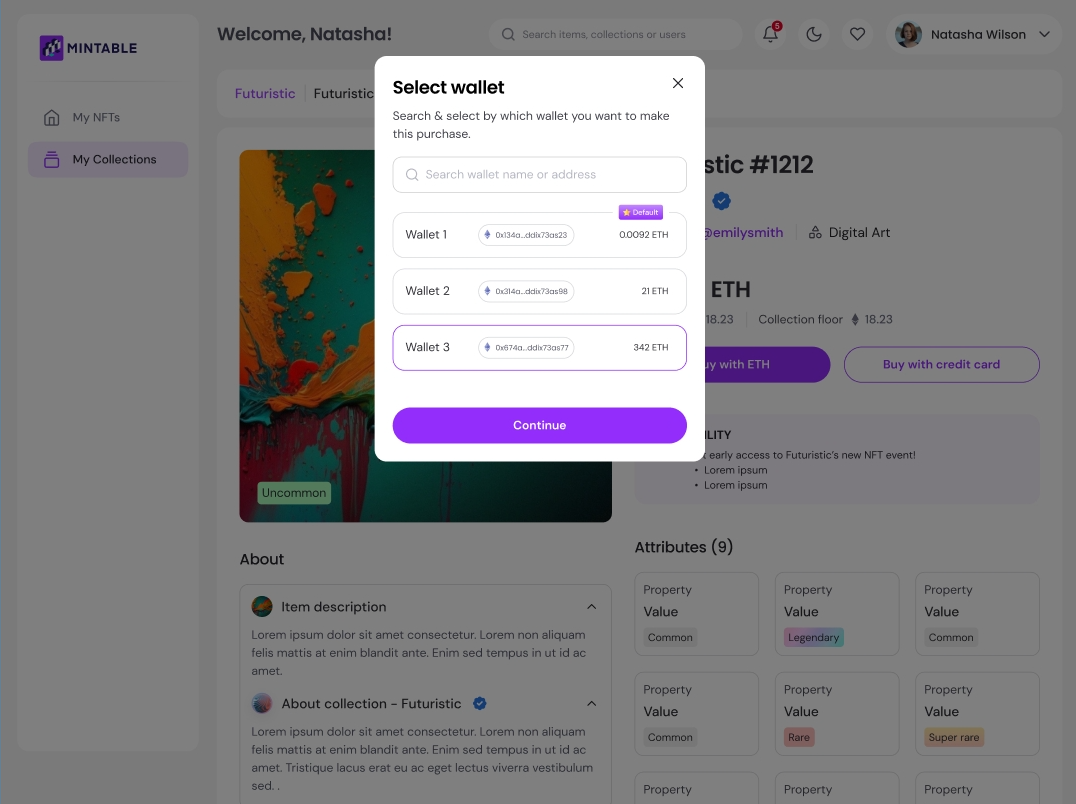
1. **Make sure your wallet is connected**\
   → You can connect MetaMask, WalletConnect, or other supported wallets
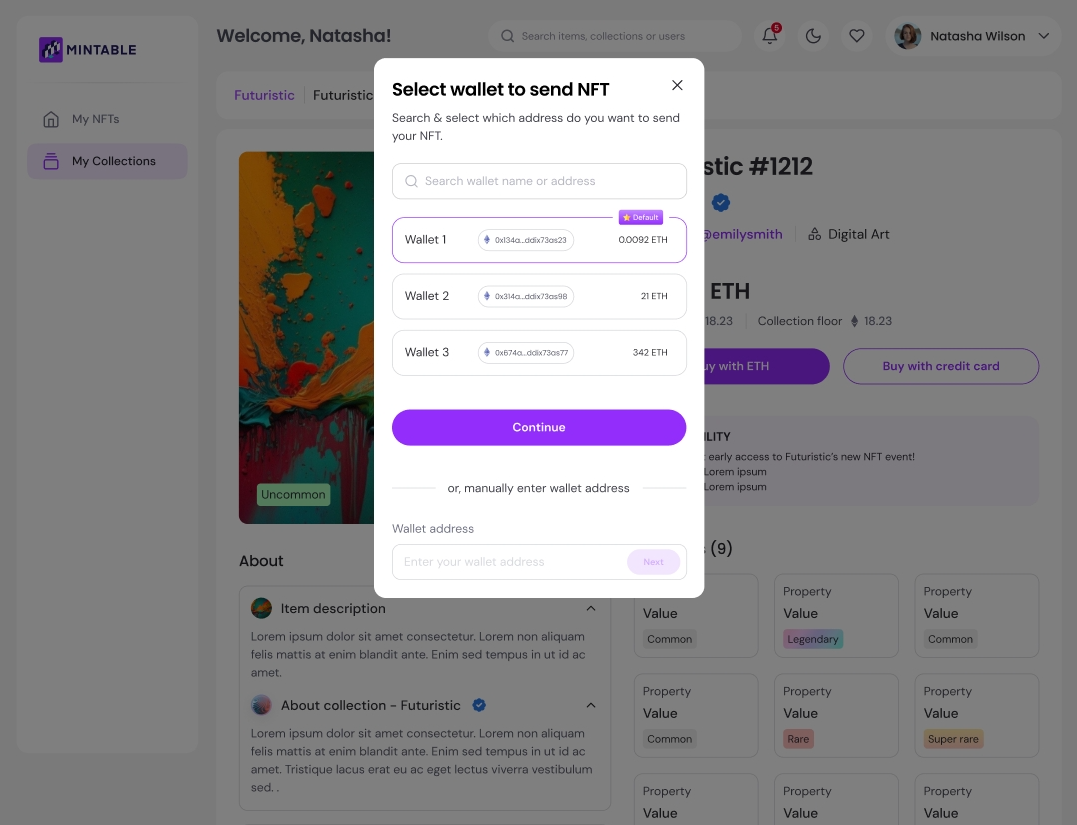
2. Select the wallet you'd like to use

<figure><img src="https://2077242324-files.gitbook.io/~/files/v0/b/gitbook-x-prod.appspot.com/o/spaces%2FroeNMrosF7gYgIymjLYO%2Fuploads%2FsZK2GDwZcAeWdj13pVlL%2Fimage.png?alt=media&amp;token=250f7252-d888-43c0-80e8-24f6d8282d26" alt=""><figcaption></figcaption></figure>

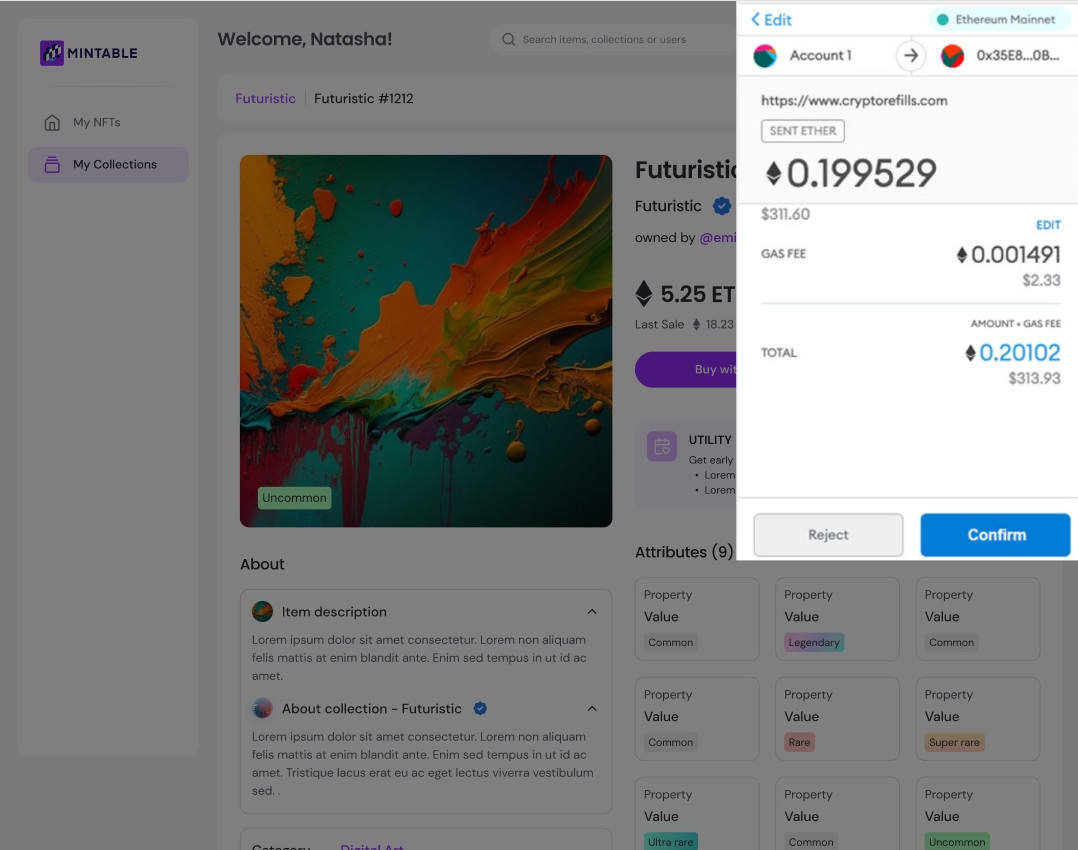
3. Confirm the purchase and approve the transaction in your wallet

<figure><img src="https://2077242324-files.gitbook.io/~/files/v0/b/gitbook-x-prod.appspot.com/o/spaces%2FroeNMrosF7gYgIymjLYO%2Fuploads%2FffnU31sEuGBB4DIATxOt%2Fimage.png?alt=media&amp;token=e14532c3-ed34-4a9b-a02f-0680258e9f99" alt=""><figcaption></figcaption></figure>

4. The transaction will be processed on the blockchain
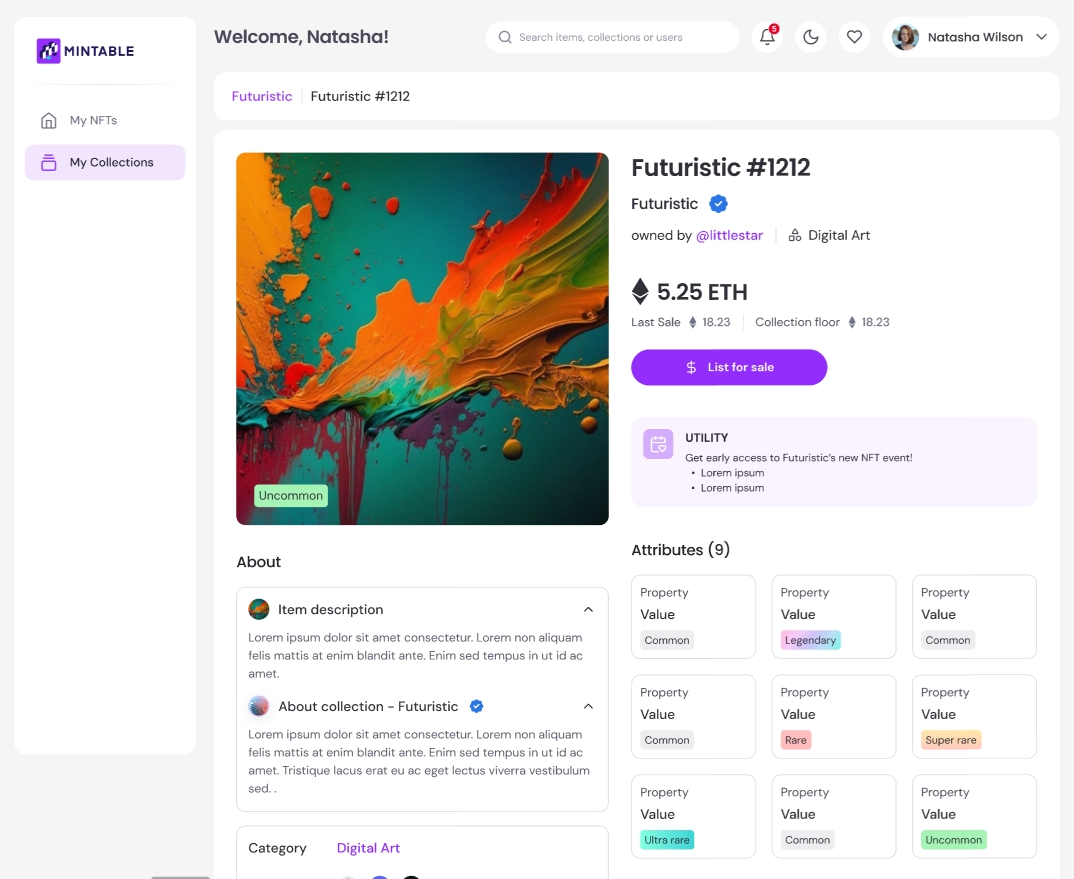
5. Within a few seconds, the NFT will appear in your account

> ✅ Once you see the option to **“List for Sale”**, it means the NFT is now in your wallet and you're good to go!

<figure><img src="https://2077242324-files.gitbook.io/~/files/v0/b/gitbook-x-prod.appspot.com/o/spaces%2FroeNMrosF7gYgIymjLYO%2Fuploads%2FHGeA00QNBu5CV7ih8ZRD%2Fimage.png?alt=media&amp;token=5ceb0c04-d770-4de3-840c-f2fc21a5d381" alt=""><figcaption></figcaption></figure>

### Buying with Credit Card

{% hint style="info" %}
Please take note there will be a 5% fee from the credit card processor.
{% endhint %}

Mintable partners with **wert.io** to securely process credit card payments.

* Choose **the Ethereum wallet** where the NFT will be delivered

<figure><img src="https://2077242324-files.gitbook.io/~/files/v0/b/gitbook-x-prod.appspot.com/o/spaces%2FroeNMrosF7gYgIymjLYO%2Fuploads%2Fwf9i1nn2jM0acYfFKciq%2Fimage.png?alt=media&amp;token=156d31fe-10fd-4d82-b6d9-380670d4f3de" alt=""><figcaption></figcaption></figure>

* Confirm your payment details

<figure><img src="https://2077242324-files.gitbook.io/~/files/v0/b/gitbook-x-prod.appspot.com/o/spaces%2FroeNMrosF7gYgIymjLYO%2Fuploads%2FCpXDDNwewQiaASxm0MKu%2Fimage.png?alt=media&amp;token=71792df4-46e4-4c70-b495-11c6efaa10ff" alt=""><figcaption></figcaption></figure>

* Wert will process the exchange of fiat currency → ETH

<figure><img src="https://2077242324-files.gitbook.io/~/files/v0/b/gitbook-x-prod.appspot.com/o/spaces%2FroeNMrosF7gYgIymjLYO%2Fuploads%2FlJhosb82IGImX2HkZ0zP%2Fimage.png?alt=media&amp;token=17c7ec88-54ab-4836-a20b-aa170a767cf5" alt=""><figcaption></figcaption></figure>

* The NFT will then be delivered to your Ethereum wallet

<figure><img src="https://2077242324-files.gitbook.io/~/files/v0/b/gitbook-x-prod.appspot.com/o/spaces%2FroeNMrosF7gYgIymjLYO%2Fuploads%2Fq6J8pP194vlBc5GdvL6v%2Fimage.png?alt=media&amp;token=8bc0d96b-d637-49ad-8299-b9a43090b489" alt=""><figcaption></figcaption></figure>

🧾 Credit card purchases require basic identity verification (KYC) for compliance with anti-money laundering (AML) laws.

### 🧠 Reminders Before Buying

* Make sure your wallet is **connected and funded with ETH** (if not using a card)
* Always **double-check** the NFT details and seller before confirming the purchase
* The NFT will **only appear** in the wallet you selected during checkout
* Transactions are **final** once processed on the blockchain


# How to Sell Items that are already in Your Wallet

Have an NFT sitting in your wallet and ready to sell it? Whether you bought it, minted it and didn’t list, or received it from another platform, you can easily list it for sale on Mintable.

### 🛠️ What’s the Difference Between Selling and Creating Items?

| Creating Items                   | Selling Items                                        |
| -------------------------------- | ---------------------------------------------------- |
| Mint a **new NFT** from scratch  | List an **existing NFT** you already own             |
| Set title, image, metadata, etc. | Set a **sale price** only                            |
| Used for **original content**    | Used for **reselling** or **listing unlisted items** |

You should **sell** instead of create if:

* You **bought an NFT** from someone else
* You **minted your own item but never listed it**
* You **own an NFT from another platform, game, or app** and want to sell it on Mintable

### ✅ Make Sure the Item Is in Your Wallet

To list any item for sale, you must **own the NFT** and have it inside your **connected Ethereum wallet**.

Check:

* If the NFT was **minted on Mintable**, it should appear under your **My NFTs**
* If the NFT came from **another service**, make sure it’s visible in your wallet and connected to Mintable

> ⚠️ If the NFT isn’t in your wallet, **you won’t be able to list it** for sale.

## 📍 Steps to Sell Your NFT

#### 1. Go to **My NFTs**

Log into your Mintable account and navigate to the **“My NFTs”** section from the top menu.

#### 2. Select the NFT You Want to Sell

Scroll through your owned NFTs and click on the one you want to list.

<figure><img src="https://2077242324-files.gitbook.io/~/files/v0/b/gitbook-x-prod.appspot.com/o/spaces%2FroeNMrosF7gYgIymjLYO%2Fuploads%2FExT3svb4Cwz3GOGy4Els%2Fimage.png?alt=media&amp;token=4c67ae1a-167d-4d35-8283-bd832c5f019e" alt=""><figcaption></figcaption></figure>

#### 3. Click **“List for Sale”**

* Click the **“List for Sale”** button
* Enter your desired price in **USD** (ETH conversion shown automatically)
* Confirm and complete the listing process

That’s it! Your NFT will now be listed on the Mintable marketplace.

<figure><img src="https://2077242324-files.gitbook.io/~/files/v0/b/gitbook-x-prod.appspot.com/o/spaces%2FroeNMrosF7gYgIymjLYO%2Fuploads%2FNq00WyBvhBAFRB9pZVOI%2Fimage.png?alt=media&amp;token=7583a2d2-62da-4af2-b283-5065af501468" alt=""><figcaption></figcaption></figure>

### 🧠 Tip

Listing an NFT for sale does **not affect ownership** — you still hold the NFT until someone purchases it.


# Collections

Mintable is introducing the Collections feature to make it easier for users to organize and navigate their NFTs — whether you're an artist, collector, trader, or just getting started.

We believe that **ease of use should always be prioritized**, and Collections are designed to bring more structure to your NFT experience.

<figure><img src="https://2077242324-files.gitbook.io/~/files/v0/b/gitbook-x-prod.appspot.com/o/spaces%2FroeNMrosF7gYgIymjLYO%2Fuploads%2F1RNVwDziHuccLTfODdZr%2Fimage.png?alt=media&amp;token=cfb8043e-4eb0-4277-9427-b34b7278c0e4" alt=""><figcaption></figcaption></figure>

### 🎨 Why Use Collections?

With Collections, you can:

* **Group your NFTs** by theme, project, or type
* **Visually separate** your tokens instead of displaying everything in a single list
* **Showcase your creative work or curated sets** more clearly to others
* **Manage sales and metadata** at a collection level for better scalability

> 💡 Whether you're selling 1-of-1 digital art, game items, or curated assets, Collections give your NFTs a **cleaner, more organized presence**.

### 🔗 Shared Contract Collections

Any user can create a Collection using Mintable’s **shared contract address**.

This allows you to:

* Skip the technical setup of your own smart contract
* Start organizing your NFTs right away
* Mint and manage NFTs under distinct Collection names — all within Mintable

> 🛠️ Collections help distinguish between different series or sets, making it easier for your buyers and followers to understand your work.

### 👀 How It Looks

Here’s a preview of how Collections appear in your dashboard and on your public profile:

<figure><img src="https://2077242324-files.gitbook.io/~/files/v0/b/gitbook-x-prod.appspot.com/o/spaces%2FroeNMrosF7gYgIymjLYO%2Fuploads%2FEjE8i5FA9zTPU4w06Qxu%2Fimage.png?alt=media&amp;token=4507961d-b831-457a-b424-226fdd407916" alt=""><figcaption></figcaption></figure>

> Cool, right?

Each Collection comes with its own:

* Title and description
* Cover image and banner
* Unique Collection page where all related NFTs are displayed together

***

### ✅ Who Can Create a Collection?

**Anyone!** Collections are available to all Mintable users, and they’re easy to create.

Want to get started?\
👉 [Learn how to create your own Collection →](https://docs.mintable.app/for-creators/collections/creating-a-collection)


# Creating a Collection

Collections are a great way to organize and showcase your NFTs on Mintable. Whether you're an artist, brand, or collector, creating a collection helps bring structure to your work

### ✅ Step-by-Step: Creating a Collection

#### 1. Go to **"My Collections"**

* Log into your Mintable account
* Click on the **“My Collections”** tab from the main menu
* Click the **“Create New Collection”** button

<figure><img src="https://2077242324-files.gitbook.io/~/files/v0/b/gitbook-x-prod.appspot.com/o/spaces%2FroeNMrosF7gYgIymjLYO%2Fuploads%2F2iL53m3wBlJoSkxmgRnm%2Fimage.png?alt=media&amp;token=7fff3562-e236-4ce9-b282-cba4f420b1e8" alt=""><figcaption></figcaption></figure>

#### 2. Fill in Your Collection Details

A pop-up form will appear asking for the following:

* **Collection Name**: The public name for your collection
* **Slug**: A URL-friendly version of your collection name (auto-filled, but editable)
* **Description**: A short explanation of what your collection is about
* **Category**: Choose the best fit (we’re always updating this — suggestions welcome!)
* **Cover Image & Banner**: Upload high-quality visuals to customize your collection’s appearance

> ⚠️ **Important:**
>
> * **Collection name and slug cannot be changed** after creation
> * The collection will be tied to your **default wallet** at the time of creation, and this **cannot be changed later**

#### 🔧 Set Your Default Wallet First

Before creating a collection, make sure your desired wallet is set as your **default wallet** — the collection will be permanently associated with it.

[👉 Learn how to set your default wallet →](https://docs.mintable.app/using-mintable/nft-wallets/setting-a-default-wallet-on-mintable)

<figure><img src="https://2077242324-files.gitbook.io/~/files/v0/b/gitbook-x-prod.appspot.com/o/spaces%2FroeNMrosF7gYgIymjLYO%2Fuploads%2F4IzYFH9K4tKcIKDujsRM%2Fimage.png?alt=media&amp;token=447028ac-e539-4456-be7f-98b1fb4590d6" alt=""><figcaption></figcaption></figure>

We are also updating the Categories on the go, so if you have any suggestions for them, please let us know!

#### 3. Submit the Form

Click **“Create Collection”** and wait a moment while your collection is created.

Once successful, you’ll see a confirmation screen like this:

<figure><img src="https://2077242324-files.gitbook.io/~/files/v0/b/gitbook-x-prod.appspot.com/o/spaces%2FroeNMrosF7gYgIymjLYO%2Fuploads%2Fx70RtD3EMmyx3zsZyyR1%2Fimage.png?alt=media&amp;token=44e9ecce-2763-43e5-be50-4315e78d0005" alt=""><figcaption></figcaption></figure>

🎉 **Your collection has been created!**

### 🛠️ Next Steps

Now that your collection is live, you can:

* Click **“Manage”** to update visuals and metadata
* Start **minting NFTs directly into your collection**
* Share your collection’s public link


# Minting to Collection

To Mint to Collection, click "Mint NFTs".

<figure><img src="https://2077242324-files.gitbook.io/~/files/v0/b/gitbook-x-prod.appspot.com/o/spaces%2FroeNMrosF7gYgIymjLYO%2Fuploads%2FqtGMu4spLG3GUamWM3PN%2Fimage.png?alt=media&amp;token=4b7fbbf5-2c53-4c7a-b088-c339089b517a" alt=""><figcaption></figcaption></figure>

As per usual, upload your images & key in all the details


# Manage Collections

List and hide NFTs in your collection page. View details about your NFTs, their holders, sales data & more.

### 📊 Collection Insights

When you open a Collection, you’ll see key data at a glance:

* **Floor Price**
* **Total Volume**
* **Number of NFTs in the Collection**
* **Number of Unique Owners**

This helps you monitor your collection’s performance and visibility in the marketplace.

<figure><img src="https://2077242324-files.gitbook.io/~/files/v0/b/gitbook-x-prod.appspot.com/o/spaces%2FroeNMrosF7gYgIymjLYO%2Fuploads%2F0xf3nVD0I1lNRrtfDQpT%2Fimage.png?alt=media&amp;token=c0e97a10-4a43-46e3-be50-f003085faab0" alt=""><figcaption></figcaption></figure>

<figure><img src="https://2077242324-files.gitbook.io/~/files/v0/b/gitbook-x-prod.appspot.com/o/spaces%2FroeNMrosF7gYgIymjLYO%2Fuploads%2FEjE8i5FA9zTPU4w06Qxu%2Fimage.png?alt=media&amp;token=4507961d-b831-457a-b424-226fdd407916" alt=""><figcaption></figcaption></figure>

Managing your NFTs just got easier! On Mintable, you can now **bulk hide**, and **unhide** NFTs directly from your Collection page — saving you time while giving you more control over your items.

### 🙈 Bulk-Hiding NFTs

You might want to hide NFTs to edit them or simply remove them from public view.

#### To hide NFTs in bulk:

1. Go to your Collection page
2. Select the NFTs you want to hide

<figure><img src="https://2077242324-files.gitbook.io/~/files/v0/b/gitbook-x-prod.appspot.com/o/spaces%2FroeNMrosF7gYgIymjLYO%2Fuploads%2F2CrU8iyo5Bqsog6Us5jm%2Fimage.png?alt=media&amp;token=344953c6-a49b-480e-a4ad-0f7db4b15d51" alt=""><figcaption></figcaption></figure>

3. Click **“Hide NFTs”** at the bottom-right of the screen

> ✅ These NFTs will now be hidden from your public Collection view. You can unhide them anytime.

<figure><img src="https://2077242324-files.gitbook.io/~/files/v0/b/gitbook-x-prod.appspot.com/o/spaces%2FroeNMrosF7gYgIymjLYO%2Fuploads%2FsmwaLCIZLuZTwzdawR6R%2Fimage.png?alt=media&amp;token=abd6ef90-ccde-4c28-888a-0508d5d1b43d" alt=""><figcaption></figcaption></figure>

### 👁️ Unhiding NFTs

Want to bring your hidden NFTs back into view?

#### 1. Open the Collection page

2. Click the **three dots (⋯)** next to **“Select NFTs”**
3. Choose **“View Hidden NFTs”**

<figure><img src="https://2077242324-files.gitbook.io/~/files/v0/b/gitbook-x-prod.appspot.com/o/spaces%2FroeNMrosF7gYgIymjLYO%2Fuploads%2FScefrombg9NlTQvicDqz%2Fimage.png?alt=media&amp;token=33d86365-32e7-48e0-a87d-9afbe105c557" alt=""><figcaption></figcaption></figure>

4. Select the NFTs you want to unhide
5. Click the **“Unhide”** button at the bottom right

<figure><img src="https://2077242324-files.gitbook.io/~/files/v0/b/gitbook-x-prod.appspot.com/o/spaces%2FroeNMrosF7gYgIymjLYO%2Fuploads%2F3umZ9fBqiUPvM5Km7182%2Fimage.png?alt=media&amp;token=e2ce12d1-fff6-4cf9-a9e6-b52a61a22357" alt=""><figcaption></figcaption></figure>

Your NFTs will now be visible again in your collection.

<figure><img src="https://2077242324-files.gitbook.io/~/files/v0/b/gitbook-x-prod.appspot.com/o/spaces%2FroeNMrosF7gYgIymjLYO%2Fuploads%2FD38OP4EHR6BDNpNU7icS%2Fimage.png?alt=media&amp;token=e27c5afb-1a5e-45b1-a289-c58dd98ecd66" alt=""><figcaption></figcaption></figure>


# Listing from Collection

### ✅ Step-by-Step: Listing an NFT Individually

#### 1. Go to **My Collections**

* Navigate to your collection from your dashboard
* Open the collection where your NFT is stored

#### 2. Hover Over the NFT You Want to List

* Move your mouse over the NFT
* Click the **“List for Sale”** button that appears

<figure><img src="https://2077242324-files.gitbook.io/~/files/v0/b/gitbook-x-prod.appspot.com/o/spaces%2FroeNMrosF7gYgIymjLYO%2Fuploads%2FUdbszJhv0vdyEPIOaEtO%2Fimage.png?alt=media&amp;token=f15efedc-d5c1-4f54-8dfb-a4ac40d50b25" alt=""><figcaption></figcaption></figure>

#### 3. Set Your Price

* Enter the price you’d like to list the NFT for\
  → You can input the amount in **ETH or USD** — Mintable will automatically convert between the two

> 💡 This price is **only for this specific NFT**.\
> If you're looking to list multiple NFTs at once for the same price, use our Bulk Listing feature.

<figure><img src="https://2077242324-files.gitbook.io/~/files/v0/b/gitbook-x-prod.appspot.com/o/spaces%2FroeNMrosF7gYgIymjLYO%2Fuploads%2FBafTEaV6XQ1KHeTbYDIR%2Fimage.png?alt=media&amp;token=19bbca06-28a8-4269-a94e-eb435fe0a818" alt=""><figcaption></figcaption></figure>

#### 4. Review Total Earnings

* Mintable will display your **“Total Earnings”** after deducting the marketplace fee
* No payment is needed from your end — Mintable handles fee deductions automatically and sends the earnings **directly to your wallet**

{% hint style="warning" %}
🔒 **Reminder:** Mintable will *never* ask you to send ETH, share your seed phrase, or download any unverified apps. Always stay cautious.
{% endhint %}

<figure><img src="https://2077242324-files.gitbook.io/~/files/v0/b/gitbook-x-prod.appspot.com/o/spaces%2FroeNMrosF7gYgIymjLYO%2Fuploads%2FuNILYCHFvo44m6JE1t1C%2Fimage.png?alt=media&amp;token=789d26ac-56e0-4907-b9a2-1c3e0583a519" alt=""><figcaption></figcaption></figure>

#### 5. Finalize and Promote

Once listed, you’ll have the option to:

* ✅ **View your listing** on the marketplace
* 📣 **Share your listing** on social media to attract potential buyers


# Bulk Listing NFTs for Sale

📦To list multiple NFTs at once:

#### 1. Go to your **Collection Page**

Navigate to your desired collection from **“My Collections.”**

<figure><img src="https://2077242324-files.gitbook.io/~/files/v0/b/gitbook-x-prod.appspot.com/o/spaces%2FroeNMrosF7gYgIymjLYO%2Fuploads%2Fg7RMiQrcSdbuuyXBflxu%2Fimage.png?alt=media&amp;token=1ae1a728-ecfb-4020-b177-f7eda3d921f2" alt=""><figcaption></figcaption></figure>

<figure><img src="https://2077242324-files.gitbook.io/~/files/v0/b/gitbook-x-prod.appspot.com/o/spaces%2FroeNMrosF7gYgIymjLYO%2Fuploads%2FGcsR3Hw0m7AGBwJUo73F%2Fimage.png?alt=media&amp;token=62e5eb5d-393a-4368-a0e3-13c69a4f9fd1" alt=""><figcaption></figcaption></figure>

#### 2. Select NFTs to List

* Click the checkboxes next to each NFT you want to list
* Use **“Select All NFTs”** or **“Clear All”** to manage faster

#### 3. Set a Price

* Enter the price you want to set — in **ETH** or **USD**
* This price will apply **uniformly to all selected NFTs**

> 💡 If you want to list NFTs at different prices, please list them individually.

<figure><img src="https://2077242324-files.gitbook.io/~/files/v0/b/gitbook-x-prod.appspot.com/o/spaces%2FroeNMrosF7gYgIymjLYO%2Fuploads%2FSItBW7OBktW2rRqMvWO9%2Fimage.png?alt=media&amp;token=21c01ece-a78e-44dc-b71e-78fbfb782cb4" alt=""><figcaption></figcaption></figure>

#### 4. Review Earnings

* Mintable shows your **Total Earnings** after marketplace fees are deducted
* **No extra payment is required** — your net earnings will be sent directly to your wallet

{% hint style="warning" %}
🚫 **Mintable will never ask you to send ETH, share your seed phrase, or download unverified apps. Stay safe!**

\
Mintable will also not ask you to send any ETH/ seed phrase/ download any unverified apps.&#x20;
{% endhint %}

<figure><img src="https://2077242324-files.gitbook.io/~/files/v0/b/gitbook-x-prod.appspot.com/o/spaces%2FroeNMrosF7gYgIymjLYO%2Fuploads%2FaLgSiCppJIihuXOaqXno%2Fimage.png?alt=media&amp;token=d151cd7e-447e-479d-b29f-073ff33cb0bb" alt=""><figcaption></figcaption></figure>

#### 5. Finalize & Share

* After listing, you can choose to **View Listings** or **Share Listings** to promote your NFTs

<figure><img src="https://2077242324-files.gitbook.io/~/files/v0/b/gitbook-x-prod.appspot.com/o/spaces%2FroeNMrosF7gYgIymjLYO%2Fuploads%2Fg7RMiQrcSdbuuyXBflxu%2Fimage.png?alt=media&amp;token=1ae1a728-ecfb-4020-b177-f7eda3d921f2" alt=""><figcaption></figcaption></figure>


# Customise Collection Page

Make your collection stand out by customizing your collection page on Mintable! Whether you’re an artist, a project founder, or a collector, your collection page is your storefront — so make it shine.

### 🛠️ What You Can Customize

You can update almost everything about your collection’s appearance and identity:

| Element         | Purpose                                           |
| --------------- | ------------------------------------------------- |
| **Logo**        | Appears as the collection’s thumbnail/icon        |
| **Banner**      | Featured image across the top of your collection  |
| **Title**       | Public name of your collection                    |
| **Description** | Share your project’s story or mission             |
| **Utility**     | Outline NFT use cases, perks, or community access |
| **Socials**     | Link your Twitter, Instagram, website, etc.       |

> ✅ A well-branded collection builds **trust**, **recognition**, and **community engagement**.

<figure><img src="https://2077242324-files.gitbook.io/~/files/v0/b/gitbook-x-prod.appspot.com/o/spaces%2FroeNMrosF7gYgIymjLYO%2Fuploads%2FX8191CqbaxJgpgNKDIk4%2Fimage.png?alt=media&amp;token=c83bd1ad-4cd5-499f-9f5f-a452d234b70a" alt=""><figcaption></figcaption></figure>

### 📍 How to Edit Your Collection

1. Go to **“My Collections”**
2. Click the **collection** you want to edit
3. Click **“Customise collection Page"**
4. Upload or update:
   * Logo (recommended: 500x500px)
   * Banner (recommended: 1440x260px)
   * Title and description
   * Utilities or special perks
   * Social links (Twitter, Instagram, Discord, website, etc.)
5. Click **“Save Changes”** to apply your updates

<figure><img src="https://2077242324-files.gitbook.io/~/files/v0/b/gitbook-x-prod.appspot.com/o/spaces%2FroeNMrosF7gYgIymjLYO%2Fuploads%2Fc8XnlLNYOEJpYqdYDgPg%2Fimage.png?alt=media&amp;token=46073af4-35ef-4156-baff-b8f6bef4ebc0" alt=""><figcaption></figcaption></figure>

### 💡 Tips for a Strong Collection Page

* **Use high-quality visuals** for your logo and banner
* **Tell your story** in the description — include mission, vision, or roadmap
* **Link all relevant socials** to improve credibility and discoverability
* Add **utility** or perks to help your NFTs stand out
* Check your page in **Preview Mode** before sharing

***

### 📣 Ready to Share?

Once your collection page looks the way you want:

* Share it with your audience on social media
* Use your Mintable collection link to promote your drop
* Keep updating your page as your project evolves


# Creating NFTs

See the NFTs you currently have in your wallet!

Before you can manage or sell your NFTs on Mintable, make sure you’ve properly connected your wallet or are using the Mintable Custodial Wallet. Here’s how to get started and what to do if your tokens aren’t showing.

### 🔐 Step 1: Connect Your Wallet

To begin creating or managing NFTs on Mintable, you must connect a wallet:

* Click **"Connect a Wallet"** at the top of the page
* Choose a wallet (e.g., MetaMask, WalletConnect, or another supported Ethereum wallet)
* Alternatively, you can use your **Mintable Custodial Wallet**, which is automatically created when you sign up on Mintable and mint via the platform

> ✅ Mintable supports **ERC-721** tokens — the standard used for most NFTs on Ethereum.

***

### 👀 Can't See Your Tokens?

If your NFTs aren’t showing in your dashboard, it may be due to one of the following:

* **Loading issue**: Sometimes NFT data can fail to load. If Mintable can’t fetch the metadata for an NFT, it won’t be displayed
* **Network issue**: Ensure your wallet is on the **Ethereum mainnet**, not a testnet or alternate chain
* **Wrong wallet connected**: Double-check you’ve connected the wallet that actually holds your tokens
* **Token type not supported**: Mintable currently supports only **ERC-721** tokens — **ERC-1155** is not yet supported

> 🛠 Try refreshing the page or reconnecting your wallet if tokens fail to load.

***

### 🔁 What Can You Do With Your Tokens?

Once your NFTs are visible on Mintable, you can:

#### 🔄 Transfer Your Tokens

You can send your NFT to another wallet address (e.g., gifting or moving it to another account).

👉 Learn [how to transfer NFTs →](/for-creators/creating-nfts/how-to-transfer-nfts-on-mintable)

***

#### 🏷️ Sell Your Tokens

You can list NFTs for sale directly from your **My NFTs** or **Collections** page.

👉 Learn how to [list your NFT for sale →](/for-creators/collections/listing-from-collection)


# How to create an item

Create your content and sell it - while it lives forever on the blockchain

<figure><img src="https://2077242324-files.gitbook.io/~/files/v0/b/gitbook-x-prod.appspot.com/o/spaces%2FroeNMrosF7gYgIymjLYO%2Fuploads%2FWKgxtvS9QyCz17pU9uWL%2Fimage.png?alt=media&amp;token=6fca34c8-c3f8-4551-9f2d-1fbaff70d053" alt=""><figcaption></figcaption></figure>

### ✅ Step 1: Make Sure You Have a Collection

Before you can mint your NFT, you’ll need to create or select a **Collection** to hold it.

> 📚 Learn more: [What are Collections?](https://docs.mintable.app/for-creators/collections)

### 🖼️ Step 2: Click “Mint an NFT”

1. From your Mintable dashboard, navigate to the **bottom left**
2. Click the **“Mint an NFT”** button
3. This will open the NFT creation form

<figure><img src="https://2077242324-files.gitbook.io/~/files/v0/b/gitbook-x-prod.appspot.com/o/spaces%2FroeNMrosF7gYgIymjLYO%2Fuploads%2FIUkOI3v3P31zdufhyqka%2Fimage.png?alt=media&amp;token=008fa306-ead3-485a-affb-47a01cd1ddae" alt=""><figcaption></figcaption></figure>

### ✍️ Step 3: Fill Out the NFT Details

<figure><img src="https://2077242324-files.gitbook.io/~/files/v0/b/gitbook-x-prod.appspot.com/o/spaces%2FroeNMrosF7gYgIymjLYO%2Fuploads%2FbSfSAheS5iC3nlzelqFg%2Fimage.png?alt=media&amp;token=8dc6cd97-bda4-4395-874c-9abf6a77e1f8" alt=""><figcaption></figcaption></figure>

Here’s what you’ll need to complete your mint:

#### 🔳 NFT Image

* First image becomes the **default image on the blockchain**
* Cannot be changed after minting
* Supports: images, MP4 video, .GLB 3D files
* Max size: **300MB**
* **Recommended preview image size:** 800px x 800px or larger

#### 📁 Collection

* Choose the collection you want to mint this NFT under
* Make sure the selected collection is correct — this cannot be changed later

#### 🏷️ Token Name

* This is the **on-chain name** of your NFT
* It can be the same as your display title

#### ✏️ Description

* Tell the story behind your NFT
* Great descriptions help your item stand out

#### 🧬 Attributes

* Define unique traits of your NFT (e.g., Color: Red, Type: Rare)
* Help filter NFTs on your collection page

#### 💲 Price

* Set your sale price in **USD** — ETH conversion shown dynamically

#### 📜 Transfer Copyright (Optional)

* Option to transfer copyright on-chain to the buyer
* Stored on the blockchain and referenceable via the block explorer

### 📝 Step 4: Sign the Transactions via MetaMask

When you're ready to mint, you’ll be prompted to **sign** to list it for sale (optional, if you chose to list immediately)

{% hint style="danger" %}
Do not close the page or leave until you see the confirmation popup. \
If you do not see the popup, please ensure your ad blocker is disabled and check if your wallet is connected properly.
{% endhint %}

### 🎉 Step 5: Success!

Congratulations — your NFT is now minted and listed!

* You’ll see a confirmation popup once everything is complete
* Share the link to your NFT to attract buyers and promote your work across social media and communities


# Managing NFT Tags on Mintable

Mintable lets you create and apply **personal NFT tags** so you can better organize and navigate your NFT collections — especially when managing multiple assets across wallets.

These tags are **for personal use only**, meaning they won't be shown publicly, and they're fully customizable to match your style and preferences.

<figure><img src="https://2077242324-files.gitbook.io/~/files/v0/b/gitbook-x-prod.appspot.com/o/spaces%2FroeNMrosF7gYgIymjLYO%2Fuploads%2FnKoFIGH3eHg4efUNogpo%2Fimage.png?alt=media&amp;token=9ce87371-b89b-479c-8a99-f7a19c56a9a6" alt=""><figcaption></figcaption></figure>

## 🆕Creating Tags

To create your first tag:

1. Go to your **"My NFTs"** dashboard
2. Hover over the NFT you want to tag
3. Click the **three dots icon (⋯)**
4. Select **"Tag NFT"**

<figure><img src="https://2077242324-files.gitbook.io/~/files/v0/b/gitbook-x-prod.appspot.com/o/spaces%2FroeNMrosF7gYgIymjLYO%2Fuploads%2Fk9rRDEs4MO5OkzLbiWXU%2Fimage.png?alt=media&amp;token=7e6168e5-8247-4dcb-9735-bf6809a08c36" alt=""><figcaption></figcaption></figure>

* Under the **"Create new tag"** section:
  * Enter your tag name (e.g., *My Favorites*)
  * Choose a **background color** and **text color (**&#x48;ere, I named it "My Favorites" and chose the white background)
* Click **"Save Tag"**

<figure><img src="https://2077242324-files.gitbook.io/~/files/v0/b/gitbook-x-prod.appspot.com/o/spaces%2FroeNMrosF7gYgIymjLYO%2Fuploads%2FUGlcS7yyvLo7IbUmbUFs%2Fimage.png?alt=media&amp;token=d8ba6c1a-73ae-4066-ba39-b323af5eb3b1" alt=""><figcaption></figcaption></figure>

Your tag will now be applied to the NFT you selected.

<figure><img src="https://2077242324-files.gitbook.io/~/files/v0/b/gitbook-x-prod.appspot.com/o/spaces%2FroeNMrosF7gYgIymjLYO%2Fuploads%2FDvH7g7rj1TLPCZTkstdB%2Fimage.png?alt=media&amp;token=45daba3f-2333-4f38-b57d-fdea58785939" alt=""><figcaption></figcaption></figure>

## ✅ Applying Tags to Other NFTs

After creating a tag, you can apply it to more NFTs individually or in bulk.

#### To tag one NFT:

1. Hover over the NFT
2. Click the **three dots (⋯)**
3. Select **"Tag NFT"**
4. Choose any existing tag(s)
5. Click **"Done"**

<figure><img src="https://2077242324-files.gitbook.io/~/files/v0/b/gitbook-x-prod.appspot.com/o/spaces%2FroeNMrosF7gYgIymjLYO%2Fuploads%2FOB4cEyRdq6SPpi5b76Eg%2Fimage.png?alt=media&amp;token=fac981a1-94f3-4c5e-a154-7cbf2f8c074b" alt=""><figcaption></figcaption></figure>

<figure><img src="https://2077242324-files.gitbook.io/~/files/v0/b/gitbook-x-prod.appspot.com/o/spaces%2FroeNMrosF7gYgIymjLYO%2Fuploads%2F2nDrsPrdh6bOF4BFz7l5%2Fimage.png?alt=media&amp;token=ca74f4b0-6881-4355-bde6-1cc912a150b1" alt=""><figcaption><p>How it will look like when multiple tags are used</p></figcaption></figure>

#### To tag multiple NFTs:

1. Select multiple NFTs using the checkboxes
2. Click the **"Tag"** button at the bottom right

<figure><img src="https://2077242324-files.gitbook.io/~/files/v0/b/gitbook-x-prod.appspot.com/o/spaces%2FroeNMrosF7gYgIymjLYO%2Fuploads%2F2QWuOn1PM9g2LBew5BI0%2Fimage.png?alt=media&amp;token=da155074-c39f-4015-965e-d045a9b2afe7" alt=""><figcaption></figcaption></figure>

3. Select one or more existing tags — or create a new one on the spot
4. Click **"Done"**

<figure><img src="https://2077242324-files.gitbook.io/~/files/v0/b/gitbook-x-prod.appspot.com/o/spaces%2FroeNMrosF7gYgIymjLYO%2Fuploads%2FgQr1GGBX9Q52mlqOGY0R%2Fimage.png?alt=media&amp;token=13ec587b-e013-4778-a68a-ceaba2917509" alt=""><figcaption></figcaption></figure>

{% hint style="success" %}
You can tag NFTs across different wallets — the bulk tagging feature works across your entire connected collection.
{% endhint %}

<figure><img src="https://2077242324-files.gitbook.io/~/files/v0/b/gitbook-x-prod.appspot.com/o/spaces%2FroeNMrosF7gYgIymjLYO%2Fuploads%2F5Gvf9Snzi8EdSzDBJIjW%2Fimage.png?alt=media&amp;token=b40e6c1f-7b64-4521-aa65-56f8e90c2d80" alt=""><figcaption></figcaption></figure>

## ✏️Editing & Deleting Tags

To manage your existing tags:

1. Navigate to **"My NFTs"**
2. Click **"Manage Tags"** at the top of the page

<figure><img src="https://2077242324-files.gitbook.io/~/files/v0/b/gitbook-x-prod.appspot.com/o/spaces%2FroeNMrosF7gYgIymjLYO%2Fuploads%2FvzG3fe6EoraH1aS6Ym3s%2Fimage.png?alt=media&amp;token=41e24d21-c419-4216-b964-68c6f74e4c7d" alt=""><figcaption></figcaption></figure>

#### To edit a tag:

* Click the **pencil icon** next to the tag
* Change the **name** or **colors** as needed
* Click **"Save"**

<figure><img src="https://2077242324-files.gitbook.io/~/files/v0/b/gitbook-x-prod.appspot.com/o/spaces%2FroeNMrosF7gYgIymjLYO%2Fuploads%2FV2rlMbNJpzydZVUG106N%2Fimage.png?alt=media&amp;token=166d2a53-f580-4028-8cfa-24dedcfe7e7d" alt=""><figcaption></figcaption></figure>

<figure><img src="https://2077242324-files.gitbook.io/~/files/v0/b/gitbook-x-prod.appspot.com/o/spaces%2FroeNMrosF7gYgIymjLYO%2Fuploads%2F8iJgmzM9lDdRwGD11aFB%2Fimage.png?alt=media&amp;token=cb15f3c4-aba5-4473-bf80-71896a0be7db" alt=""><figcaption></figcaption></figure>

#### To delete a tag:

* Click the **trash bin icon**
* Confirm deletion

⚠️ Deleting a tag will remove it from **all NFTs** it was previously applied to.

## 🎨 Tips

* Use tags to group NFTs by type, project, rarity, or any personal logic
* Customize with colors for quick visual scanning
* Combine tags with wallet renaming and filtering for full collection control


# Supported File Types and Image Requirements for NFTs on Mintable

When minting an NFT on Mintable, your preview image and media files are what make your item stand out — so it’s important to understand the supported formats and requirements before uploading.

### ✅ Recommended Image Dimensions

* **Minimum size:** 800px × 800px
* **Recommended:** Use **high-resolution** images larger than 800px × 800px for best results on listings and collection pages
* **Supported formats:** JPG, PNG, GIF, WEBP

***

### 🎥 Uploading MP4 and GLB Files

Mintable also supports **interactive 3D files and video files** as part of your NFT preview.

| File Type          | Description                                                      |
| ------------------ | ---------------------------------------------------------------- |
| **.GLB (3D File)** | Allows users to interact with a 3D model directly in the browser |
| **.MP4 (Video)**   | Lets users watch a video preview in the NFT’s item page          |

> ⚠️ **Important:** You must **still upload a basic image** (JPG/PNG/etc.) to serve as the **default display image**, even if you're including an MP4 or GLB file.

***

### 🚫 File Naming Requirements

Avoid special characters in file names. The following **will prevent your file from uploading**:

* Symbols like: `$ % * & # @ ( ) [ ]`
* **Non-English characters**, including accented or non-Latin scripts

> ✅ Stick to **letters, numbers, underscores, or hyphens** in file names to ensure successful uploads.

***

### 🛠️ Having Upload Issues?

If your file won’t upload, try the following troubleshooting steps:

1. **Check your file name** – remove any special characters
2. **Disable all browser extensions except MetaMask**
3. **Close all Mintable tabs**, refresh your browser, and try uploading again
4. Ensure your file meets size and format requirements


# How to edit your listing price

Need to change the price of an NFT you’ve already listed? You can easily update your listing from your collection page.

### ✅ Step-by-Step: Edit Your Listing Price

#### 1. Go to **My Collections**

* Log into your Mintable account
* Navigate to the collection where your listed NFT is located

#### 2. Find the Listed NFT

* Hover over the NFT you want to update
* Click **“Edit Listing”** when the option appears

<figure><img src="https://2077242324-files.gitbook.io/~/files/v0/b/gitbook-x-prod.appspot.com/o/spaces%2FroeNMrosF7gYgIymjLYO%2Fuploads%2FdPW9eA9hrvSl2xoukWp4%2Fimage.png?alt=media&amp;token=30707272-499b-4824-a425-1d0d7b108240" alt=""><figcaption></figcaption></figure>

#### 3. Update Your Price

* Enter the **new price** you want to set (in ETH or USD — Mintable will auto-convert)
* Confirm the change

That’s it! Your new listing price will be saved.

<figure><img src="https://2077242324-files.gitbook.io/~/files/v0/b/gitbook-x-prod.appspot.com/o/spaces%2FroeNMrosF7gYgIymjLYO%2Fuploads%2FSs8kjJtiCLSFnyfDA4db%2Fimage.png?alt=media&amp;token=2923674c-3fd3-444a-81d5-b0d294ca7e9c" alt=""><figcaption></figcaption></figure>

<figure><img src="https://2077242324-files.gitbook.io/~/files/v0/b/gitbook-x-prod.appspot.com/o/spaces%2FroeNMrosF7gYgIymjLYO%2Fuploads%2FIcWobpv0aYwe4ynRxYvn%2Fimage.png?alt=media&amp;token=ae98ab46-6eb1-4874-94f9-bbc4c1937658" alt=""><figcaption></figcaption></figure>

### 🔄 Not Seeing the Updated Price?

If your listing doesn’t reflect the updated price right away:

* Press **Ctrl + F5** (Windows) or **Cmd + Shift + R** (Mac) a few times to hard refresh the page
* Or **clear your browser cache**, then reload Mintable

This will force your browser to load the latest version of the listing data from the server.


# How to cancel your listing

Changed your mind about selling your NFT? No problem — you can cancel the listing and keep your NFT in your wallet in just a few clicks.

### ✅ Step-by-Step: Cancel a Listing

#### 1. Go to **My Collections**

* Log into your Mintable account
* Navigate to the collection that contains the listed NFT

#### 2. Hover Over the Listed NFT

* Move your mouse over the NFT you want to unlist
* Click **“Edit Listing”**

<figure><img src="https://2077242324-files.gitbook.io/~/files/v0/b/gitbook-x-prod.appspot.com/o/spaces%2FroeNMrosF7gYgIymjLYO%2Fuploads%2F7cr1YJKt8wuBDqwyhaoV%2Fimage.png?alt=media&amp;token=9440d291-d2b6-4fc4-9380-a7aa311eadf6" alt=""><figcaption></figcaption></figure>

#### 3. Click **“Cancel Listing”**

* Confirm your action
* Your NFT will be removed from the marketplace and returned to your wallet (if applicable)

> 🛡️ There are **no gas fees** to cancel a listing on Mintable, and the NFT remains in your control the entire time.

<figure><img src="https://2077242324-files.gitbook.io/~/files/v0/b/gitbook-x-prod.appspot.com/o/spaces%2FroeNMrosF7gYgIymjLYO%2Fuploads%2FdHY9FaM4hxy36jkTcvue%2Fimage.png?alt=media&amp;token=2749c98f-ccb2-48dd-a18e-5ba1cb456b9b" alt=""><figcaption></figcaption></figure>

<figure><img src="https://2077242324-files.gitbook.io/~/files/v0/b/gitbook-x-prod.appspot.com/o/spaces%2FroeNMrosF7gYgIymjLYO%2Fuploads%2FyCo6ubLFe3diMqhTIPL5%2Fimage.png?alt=media&amp;token=0875c8a5-0eef-4fb9-925a-fb9b510c9bd3" alt=""><figcaption></figcaption></figure>

### 🔄 Changes Not Showing?

If the cancellation doesn't appear right away:

* Press **Ctrl + F5** (Windows) or **Cmd + Shift + R** (Mac) to hard refresh the page
* Or clear your browser cache and reload the page

### 🧠 Tip

Canceling a listing **does not delete your NFT** — it simply removes it from public sale. You can relist it anytime from **My NFTs** or your **Collection page**.


# How to Transfer NFTs on Mintable?

Want to send an NFT to someone else? Whether you're gifting, trading, or transferring between your own wallets, Mintable makes it easy to send NFTs — securely and directly on the Ethereum blockchain.

### ✅ Step-by-Step: Transferring an NFT

#### **Step 1: Connect Your Wallet**

* Go to [Mintable](https://mintable.app) and log in to your account
* Click the **wallet icon** at the top-right of the page
* Connect your preferred Ethereum wallet (e.g., **MetaMask**, **WalletConnect**, etc.)

***

#### **Step 2: Navigate to Your NFT**

* Click on your **profile icon** and go to **"My NFTs"**
* Find the NFT you want to transfer
* Click the **“Transfer NFT”** button

<figure><img src="https://2077242324-files.gitbook.io/~/files/v0/b/gitbook-x-prod.appspot.com/o/spaces%2FroeNMrosF7gYgIymjLYO%2Fuploads%2FG2BrVmwVAL8vJooryic1%2Fimage.png?alt=media&amp;token=d9292f41-da30-49e4-95a6-afc65e26a50e" alt=""><figcaption></figcaption></figure>

#### **Step 3: Enter Transfer Details**

A pop-up window will appear:

* Ensure the **correct wallet is connected** (the one that owns the NFT)
* Enter the **recipient’s wallet address** carefully

  > ⚠️ **Double-check** the address — NFT transfers are irreversible!

<figure><img src="https://2077242324-files.gitbook.io/~/files/v0/b/gitbook-x-prod.appspot.com/o/spaces%2FroeNMrosF7gYgIymjLYO%2Fuploads%2FpWW1F1KB2ktXM0b0neB7%2Fimage.png?alt=media&amp;token=038d7807-a823-4549-a329-dfc4b4393ab9" alt=""><figcaption></figcaption></figure>

#### **Step 4: Confirm and Pay Gas Fees**

* Review the recipient's address and NFT details
* Confirm the transaction
* A MetaMask (or wallet) prompt will appear asking you to **approve and pay gas fees** in **ETH**

> 💡 **Do not edit or lower the gas limit.** Doing so may cause the transaction to fail.\
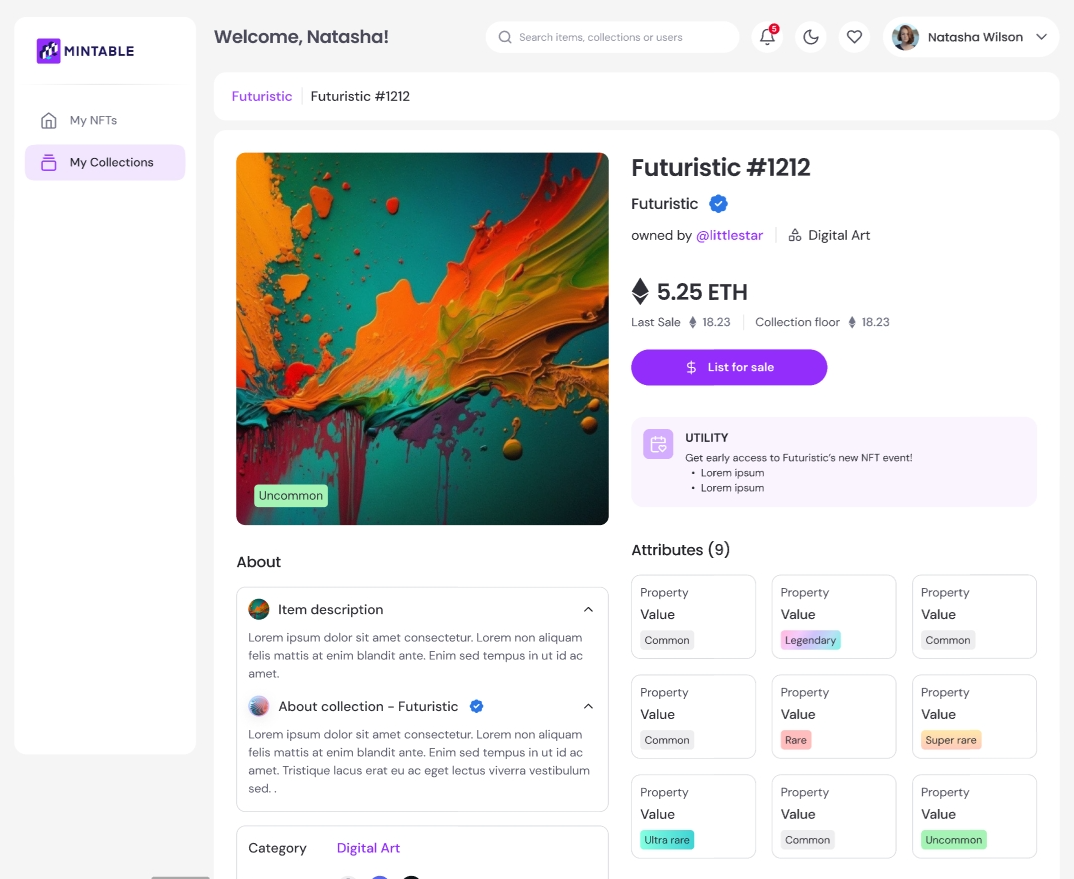
> Gas used on failed transactions **is not refundable**.

<figure><img src="https://2077242324-files.gitbook.io/~/files/v0/b/gitbook-x-prod.appspot.com/o/spaces%2FroeNMrosF7gYgIymjLYO%2Fuploads%2FfVKJUbLYNcSkD0d4nvh1%2Fimage.png?alt=media&amp;token=da813232-8b8c-423b-b119-3a673d80e472" alt=""><figcaption></figcaption></figure>

**Step 5: Track the Transfer**

* Once submitted, the transfer will be processed on the Ethereum blockchain
* You can **track the status** using [Etherscan](https://etherscan.io) by entering your wallet address or the transaction hash

{% hint style="danger" %}

### **Important Warnings**

* **Irreversibility**: Both transferring and burning NFTs on Mintable are **permanent actions**. Make sure you double-check the recipient’s wallet address when transferring NFTs, as they cannot be recovered if sent to the wrong address. Similarly, once an NFT is burned, it cannot be restored.
* **Gas Fees**: Transferring and burning NFTs require **gas fees** paid in **ETH**. The gas fees depend on Ethereum network activity and must be paid in your connected wallet.
* **Asset Loss**: Mistakes such as sending NFTs to the wrong wallet address or burning them by accident can result in the permanent loss of those assets.
  {% endhint %}

### 🧠 Pro Tip

Before transferring a high-value NFT:

* Consider sending a **test transaction** (e.g., 0 ETH or another small token) to the recipient wallet to confirm it's valid
* Always **copy and paste the recipient address** to avoid typos


# How do I delete or burn my NFTs?

Burning an NFT is a permanent and irreversible action that removes the token from your wallet and effectively from circulation.

It's a way to **guarantee scarcity** or dispose of NFTs you no longer wish to keep or sell.

Before burning, it’s important to understand what happens to the NFT on the blockchain — and what *doesn’t*.

***

### 🧾 What Happens When You Burn an NFT?

Burning an NFT means sending it to an **unspendable address**, often referred to as the **"burn address"**:

```
CopyEdit0x000000000000000000000000000000000000dEaD
```

This address cannot be accessed or owned, so anything sent to it is **effectively destroyed**.

#### ✅ What Remains After Burning:

* **Blockchain record**: The NFT’s history (minting, transfers, burns) is **permanently stored** and publicly viewable on platforms like [Etherscan](https://etherscan.io).
* **Media file**: The NFT’s linked image, video, or metadata may still exist on **decentralized storage** (like IPFS), meaning it could still be viewable via its content link.
* **Token visibility**: The token will no longer appear in your wallet or be tradable, but its past existence remains on-chain.

> 🛑 **Important**: Burning does *not* delete the NFT from the blockchain. It only makes it inaccessible and unusable.

***

### 🚨 Why Burn an NFT?

* To **guarantee verifiable scarcity**
* To **remove flawed or unwanted NFTs**
* As a symbolic or creative act (common in digital art communities)

> ⚠️ Burned NFTs cannot be recovered. Proceed only if you're absolutely sure.

### 🔥 How to Burn an NFT on Mintable

#### Step 1: Connect Your Wallet

* Go to [Mintable](https://mintable.app)
* Log in and connect your wallet (e.g. MetaMask, WalletConnect)

***

#### Step 2: Find the NFT to Burn

* Click on your profile and go to **"My NFTs"**
* Hover over the NFT you want to burn
* Click **“Transfer”**

<figure><img src="https://2077242324-files.gitbook.io/~/files/v0/b/gitbook-x-prod.appspot.com/o/spaces%2FroeNMrosF7gYgIymjLYO%2Fuploads%2FBCc0C7Fs88a7CiJ3jWW3%2Fimage.png?alt=media&amp;token=8e38ea59-82bc-4ef6-8052-5e6ed4988633" alt=""><figcaption></figcaption></figure>

#### Step 3: Initiate the Burn Process

* In the **recipient address field**, paste the **burn address**:

```
CopyEdit0x000000000000000000000000000000000000dEaD
```

* You will see a **warning** confirming this action is permanent and cannot be undone
* Double-check that this is the NFT you intend to burn

<figure><img src="https://2077242324-files.gitbook.io/~/files/v0/b/gitbook-x-prod.appspot.com/o/spaces%2FroeNMrosF7gYgIymjLYO%2Fuploads%2FikGrw7L4obykopfHMxEP%2Fimage.png?alt=media&amp;token=88d4f584-9025-410c-b9aa-54af8acb2165" alt=""><figcaption></figcaption></figure>

#### Step 4: Confirm and Pay Gas Fees

* Confirm the transfer in your connected wallet
* You’ll need to **pay a gas fee in ETH**
* Do **not adjust the gas fee** to avoid failed transactions

> 🔥 Once completed, your NFT will be sent to the burn address and **permanently removed from your collection**.

<figure><img src="https://2077242324-files.gitbook.io/~/files/v0/b/gitbook-x-prod.appspot.com/o/spaces%2FroeNMrosF7gYgIymjLYO%2Fuploads%2FWZZQQT0AzK2dL2MOWlto%2Fimage.png?alt=media&amp;token=c6bdd53b-a624-4b63-9c5e-e32f2544d675" alt=""><figcaption></figcaption></figure>

{% hint style="warning" %}
Do not edit the estimated gas fee as insufficient can cause the transaction to fail. Gas consumed for failed transactions is not recoverable/refundable by Mintable.
{% endhint %}

### 🔍 Verifying the Burn

You can confirm the burn on [Etherscan](https://etherscan.io):

1. Copy your wallet address
2. Search it on Etherscan
3. Look for the transfer of your NFT to `0x000000000000000000000000000000000000dEaD`

### 👩‍🎨 For Artists & Minters

Creators may burn NFTs to:

* **Reduce the supply** of a collection
* Prove authenticity or finality of a limited drop
* Demonstrate transparency or symbolic intent

> 🔗 Use this function with care — it builds trust through verifiable scarcity, but requires gas to execute.

### 🧠 Key Reminders

| Topic                          | Notes                                             |
| ------------------------------ | ------------------------------------------------- |
| 🔄 **Irreversible**            | Once burned, NFTs **cannot be restored**          |
| 💰 **Gas Required**            | Paid in ETH — fees vary with network congestion   |
| 📁 **Media Still Exists**      | Linked content may still be accessible online     |
| 🧱 **Blockchain Is Permanent** | Records of the NFT will **always exist** on-chain |


# How to view my NFTs in MetaMask?

Minted an NFT but don’t see it in your MetaMask wallet? No worries — you can manually import NFTs into MetaMask using your token’s contract and ID.

### ✅ Step 1: Gather Required Information

To manually import an NFT, you’ll need:

* **Contract Address** – The smart contract that minted the NFT
* **Token ID** – The unique identifier for your specific NFT

You can find this information on Mintable or via a block explorer like [Etherscan](https://etherscan.io).

### ✅ Step 2: Open MetaMask

* Launch the **MetaMask extension** in your browser or open the **MetaMask mobile app**
* Log in to the wallet **that holds the NFT**

***

### ✅ Step 3: Navigate to the NFTs Section

* In MetaMask, go to the **“NFTs” tab**
* Scroll down to the bottom

### ✅ Step 4: Import the NFT

#### On Mobile:

1. Tap **“Import NFTs”**

<figure><img src="https://2077242324-files.gitbook.io/~/files/v0/b/gitbook-x-prod.appspot.com/o/spaces%2FroeNMrosF7gYgIymjLYO%2Fuploads%2F7noMsOMUXjypS4eplXuS%2Fimage.png?alt=media&amp;token=317ff3ba-5d1b-44aa-bb3f-f283dbc6db08" alt=""><figcaption></figcaption></figure>

* &#x20;Desktop:

&#x20;

<figure><img src="https://2077242324-files.gitbook.io/~/files/v0/b/gitbook-x-prod.appspot.com/o/spaces%2FroeNMrosF7gYgIymjLYO%2Fuploads%2FvkDOvsSxlADj72QvisMS%2Fimage.png?alt=media&amp;token=02042d30-af01-4e81-8038-669525c79863" alt=""><figcaption></figcaption></figure>

2. Enter the required info:

* **Contract Address**
* **Token ID**

<figure><img src="https://2077242324-files.gitbook.io/~/files/v0/b/gitbook-x-prod.appspot.com/o/spaces%2FroeNMrosF7gYgIymjLYO%2Fuploads%2FlSJ895088O3YmIprsiYM%2Fimage.png?alt=media&amp;token=e5609431-e7c3-40c4-a761-f2d9a4944a8e" alt="" width="540"><figcaption></figcaption></figure>

3. **Confirm**:

* After entering the details, tap "Import" to add the NFT to your wallet.

### ✅ Step 5: View Your NFT

Once imported:

* Your NFT should appear under the **“NFTs” section** in MetaMask
* If the **image or metadata doesn't show immediately**, it may take a few moments to load based on network traffic

### 🧠 Important Notes

* **Metadata delay**: Some NFTs may take time to load the image, description, or other info. This is normal.
* **Check on OpenSea**: You can also confirm ownership by connecting your MetaMask to [OpenSea](https://opensea.io) and viewing your collected NFTs.
* **Contract mismatch**: If the contract address or token ID is incorrect, the import will not work.

By following these steps, you can manually import and view your NFTs in MetaMask.

{% hint style="info" %}
Phantom, Coinbase & Wallet Connect wallets may not have NFTs import function. We are liaising with them to assist on gasless minting display.

If you had minted to these wallets, please be rest assured that the NFT is still under your wallet ownership, but you can only view and interact with it on Mintable.
{% endhint %}

### 🧹 Troubleshooting

If your NFT isn’t showing in MetaMask:

* Ensure your **wallet is on Ethereum Mainnet**
* Double-check the **contract address and token ID**
* **Disable all other browser extensions** (except MetaMask) and refresh
* Try importing again after clearing your browser cache


# How do I find the contract address for my NFTs?

The contract address is the unique address of where your NFTs are stored.

### We have made it easier to check the store contract of the NFT / Collection! <a href="#we-have-made-it-easier-to-check-the-store-contract-of-the-nft-collection" id="we-have-made-it-easier-to-check-the-store-contract-of-the-nft-collection"></a>

1. On the NFTs Listing page, you can click on Collection and view the store contract.
2. Another way is to scroll down and look under the Metadata section. You can click on the contract address to view the contract on Etherscan.


# Certifying Your Rights When Minting NFTs on Mintable

Mintable is committed to upholding copyright laws, supporting original creators, and preventing fraudulent activity.

When creating and minting NFTs on Mintable, it's essential that you **own the rights to the work** you're turning into an NFT. This helps protect artists, collectors, and the integrity of the platform.

{% hint style="danger" %}
**If you took an image from Google, Instagram, or other social media locations and added a photo filter or text to an image does not qualify as your work or rights. You cannot list it as an NFT!**
{% endhint %}

### ✅ What You Agree to When Minting

During the minting process, you must confirm that:

* You are the **original creator** of the work\
  **OR**
* You have **explicit permission** to use the content for NFT creation

Mintable does **not allow**:

* Copying images from Google, Instagram, or social media
* Applying simple filters or adding text to someone else’s image and claiming ownership
* Listing works you didn’t create without documented authorization

> ⚠️ Disclaimers like *"no infringement intended"* or *"all rights belong to the original creator"* **do not make unauthorized minting acceptable**.

***

### 🧠 Questions to Ask Before Minting

Ask yourself:

1. **Do you own the original rights** to all assets in your NFT?
2. If not, have you created a **new, transformative work** that adds significant expression or meaning?
3. Will your NFT **negatively impact the original creator's value or rights**?
4. Do you have **written authorization** to use someone else's content?
5. If you're modifying existing NFT art (e.g. CryptoPunks, BAYC), do you **own the original NFT** in your wallet?

If the answer to any of these is "no," you likely **should not mint** that work on Mintable.

***

### 🛠️ What Happens If You Violate Copyright?

* Mintable may **remove the NFT** before or after a sale
* We must comply with takedown requests and **infringement reports**
* Repeated violations may result in **account suspension or banning**

***

### 🎨 Proving You’re the Original Creator

If your artwork is flagged or you fail the reverse image verification, you can submit a review request.

#### Submit Your Proof Here:

👉 [Creator Rights Verification Form](https://forms.gle/HpGD7paqiuZGaPQCA)

Please include:

* A copy of the **art in question**
* **Proof of authorship** (e.g., layered files, creation process, signed statement)

Once verified, our team will assist you in clearing the reverse image search block.

### 💬 Final Note

Mintable is committed to protecting creators and collectors from bad actors. While we take every reasonable step to verify originality, the NFT ecosystem depends on users making **informed, responsible decisions**.

Help us keep Mintable a trusted, creator-first platform.


# Marketing Assets for Project Owners

Download and place buttons on your Lander page

After claiming your store profile on Mintable, consider adding a button linking to your Mintable Profile!

![](https://docs.mintable.app/~gitbook/image?url=https%3A%2F%2F4070683621-files.gitbook.io%2F%7E%2Ffiles%2Fv0%2Fb%2Fgitbook-x-prod.appspot.com%2Fo%2Fspaces%252F-MBMfw1KGuBM0Z3DpPUt%252Fuploads%252FFLcArsdCu7QI7ZBnMmss%252FBuy%252Bon%252BMintable%252BPurple.png%3Falt%3Dmedia%26token%3Dcbf5b928-ab20-4574-9156-0d5b4bd733c3\&width=768\&dpr=4\&quality=100\&sign=ccca519b\&sv=1)![](https://docs.mintable.app/~gitbook/image?url=https%3A%2F%2F4070683621-files.gitbook.io%2F%7E%2Ffiles%2Fv0%2Fb%2Fgitbook-x-prod.appspot.com%2Fo%2Fspaces%252F-MBMfw1KGuBM0Z3DpPUt%252Fuploads%252Fb8KBbU6HvrO3LAjFOuKT%252FView%252Bon%252BMintable%252BPurple.png%3Falt%3Dmedia%26token%3D7904cff0-fcac-4793-a406-cf144d36050d\&width=768\&dpr=4\&quality=100\&sign=42e0cb14\&sv=1)![](https://docs.mintable.app/~gitbook/image?url=https%3A%2F%2F4070683621-files.gitbook.io%2F%7E%2Ffiles%2Fv0%2Fb%2Fgitbook-x-prod.appspot.com%2Fo%2Fspaces%252F-MBMfw1KGuBM0Z3DpPUt%252Fuploads%252FrPyicVyFsacX7s2d4X6W%252FBuy%252Bon%252BMintable%252BGreen.png%3Falt%3Dmedia%26token%3Dc80006e3-5114-4cf8-aa48-a0e1bfeda5f6\&width=768\&dpr=4\&quality=100\&sign=a9a206e5\&sv=1)![](https://docs.mintable.app/~gitbook/image?url=https%3A%2F%2F4070683621-files.gitbook.io%2F%7E%2Ffiles%2Fv0%2Fb%2Fgitbook-x-prod.appspot.com%2Fo%2Fspaces%252F-MBMfw1KGuBM0Z3DpPUt%252Fuploads%252F5gX9bvGFqRqx1Ub2eUl5%252FView%252Bon%252BMintable%252BGreen.png%3Falt%3Dmedia%26token%3Db3f88aee-df81-49ce-9534-1c803e81b65c\&width=768\&dpr=4\&quality=100\&sign=83eb1f82\&sv=1)

Looking for different Mintable logos or brand guidelines? Click [here](https://mintable.com/media) for our branding kit.


# What is a Claimable NFT?

A **Claimable NFT** is a pre-minted NFT that users can receive (or “claim”) into their wallet — **for free** — often without needing to pay gas or hold ETH. Claimables provide a frictionless, instant way to distribute NFTs at scale, ideal for onboarding, giveaways, marketing campaigns, and community engagement.

When powered by **Mintology’s gasless minting**, claimable NFTs are fully on Ethereum mainnet and **cost nothing for the user to mint** — no wallet balance required, no hidden fees, and no strings attached.

***

### 🔑 Key Features

* **✅ No Gas Fees**\
  Users claim the NFT directly to their wallet without spending ETH.
* **⚡ Instant & Seamless**\
  Claiming takes seconds and works across all major wallets.
* **🛠️ Fully On-Chain, Real ERC-721s**\
  These are real NFTs on Ethereum — transferable, sellable, and verifiable.
* **📈 High Conversion Funnel**\
  Eliminates wallet friction, allowing anyone to claim with just a few clicks.

***

### 💼 Use Cases

| For Brands                           | For Creators                                     | For Developers                                                |
| ------------------------------------ | ------------------------------------------------ | ------------------------------------------------------------- |
| Giveaways, loyalty drops, IRL events | Free collectible releases or token-gated content | Embed frictionless NFT claiming into apps, games, or websites |

***

### 🛒 How Claimables Work on Mintable

1. **Mintable Creates a Collection** using Mintology’s gasless tech
2. **Users Visit the Claim Page** on Mintable
3. **Click "Claim" → Wallet Connects** (no ETH needed)
4. **NFT Appears in User Wallet**, instantly and for free

***

### 📣 Why It Matters

Claimables are the gateway to mass adoption of NFTs. By removing gas fees and wallet friction, they make blockchain accessible to **everyone** — fans, customers, and communities alike. When backed by **Mintology**, claimables become a powerful tool for **growth, engagement, and brand innovation** on Ethereum.


# How to Create a Claimable NFT collection?

This guide explains how to create a claimable NFT collection directly on the Mintable marketplace, powered entirely by Mintology’s gasless minting infrastructure.

The goal is to demonstrate the simplicity, scalability, and zero-friction experience of Mintology’s gasless tech — enabling brands, creators, and developers to distribute NFTs **without requiring users to pay gas or hold ETH**.

**✅ Step 1: Create your Collection**

* Start by creating a collection that suits your drop.

  🔗 Follow this guide: [Creating a Collection on Mintable](https://docs.mintable.app/for-creators/collections/creating-a-collection)

  Customize the collection name, description, cover image, and other details according to your preferences.

**🔐 Step 2: Create the NFT**

* Go to [Mintable Marketplace](https://marketplace.mintable.com/)
* From the sidebar, select **“Mint New NFT”**

<figure><img src="https://2077242324-files.gitbook.io/~/files/v0/b/gitbook-x-prod.appspot.com/o/spaces%2FroeNMrosF7gYgIymjLYO%2Fuploads%2FlBQAtuXNGkkyFcTpr3MM%2FMint%20new.png?alt=media&amp;token=d9f4dbe9-8393-4463-a19d-568a59b18e42" alt=""><figcaption></figcaption></figure>

* Fill in your NFT details (title, media, description, etc.)

<figure><img src="https://2077242324-files.gitbook.io/~/files/v0/b/gitbook-x-prod.appspot.com/o/spaces%2FroeNMrosF7gYgIymjLYO%2Fuploads%2FMon4R8xf5CDlMdhnVjVv%2Fimage.png?alt=media&amp;token=5b680236-7eec-4873-8954-b5c449ea539e" alt=""><figcaption></figcaption></figure>

* Under **NFT Type**, choose **“Claimable NFTs”**
* Enter the number of claimables you'd like to create (up to 50 per collection)

{% hint style="info" %}
Each claimable collection on Mintable currently supports up to **50 NFTs**.\
If you're looking to scale beyond this limit, consider leveraging [**Mintology's infrastructure**](https://www.mintology.app/), which offers flexible, high-volume distribution options — perfect for larger drops and enterprise use cases.
{% endhint %}

<figure><img src="https://2077242324-files.gitbook.io/~/files/v0/b/gitbook-x-prod.appspot.com/o/spaces%2FroeNMrosF7gYgIymjLYO%2Fuploads%2FBsBQordTQwhk6jUyZx5A%2Fimage.png?alt=media&amp;token=870cf909-51ff-405d-b67e-b39ebdd7e176" alt=""><figcaption></figcaption></figure>

* Once you are done, click "Publish".

If the publish was successful, you will be able to find your NFTs under the [Dashboard](https://marketplace.mintable.com/dashboard).

For more information on Claimable NFT's use cases, you can check out our [Mintology's blogs](https://blog.mintology.app/).&#x20;


# Why Buy NFTs? What Makes Them Valuable?

### 🧬 1. **Uniqueness**

Every NFT is **one-of-a-kind**.

* No duplicate token IDs can exist under the same smart contract
* Ownership and authenticity are **verifiable on the blockchain**
* You can publicly prove you own the original — not a copy

> 🛠 NFTs are digital collectibles with built-in proof of originality.

***

### ©️ 2. **Copyrights (Optional)**

Some NFTs come with **usage rights or full copyrights**, depending on the creator’s terms.

* Artists may **transfer commercial rights** or allow redistribution
* Terms of use are often included in the **NFT description or metadata**

> ⚠️ Always read the listing description carefully to understand the rights you're getting.

***

### 💠 3. **Rarity**

Rarity drives value.

* Many NFT projects release **limited editions** (1/1s or small batch drops)
* Owning a rare piece means **you’re part of an exclusive group** of collectors
* Rarity increases the potential for **value appreciation** over time

> The scarcer the supply, the higher the demand.

***

### 🎯 4. **Collectibility**

NFTs are **digital collectibles** — much like trading cards, art prints, or stamps.

* Their value often increases with community growth, cultural relevance, or brand power
* Many buyers **flip NFTs** for profit by trading collectibles as they appreciate in value

> 💰 Some collectors make a living trading NFTs — buying low, selling high.

***

### 🔓 5. **Unlockable Downloadable Content**

NFTs can include **bonus downloadable content** that only the owner can access:

* Game assets
* Music files
* Exclusive PDFs or artwork
* Secret utility for holders

> Unlockables create additional value **beyond the visual asset** — available only to owners.

***

### 🔐 6. **Immutability**

Once minted, NFTs are **permanent**:

* No one can change or delete the metadata
* The art, title, and token history are **unchangeable and transparent**
* This makes NFTs reliable long-term assets

> What you buy today will **always remain exactly as it was created**.

***

### ⏳ 7. **They Last Forever**

NFTs live **forever on the blockchain**.

* You’ll always own the NFT unless you sell or transfer it
* Your ownership history stays intact — forever
* Unlike traditional servers, **the blockchain can’t go offline or be wiped**

> Think of NFTs like **digital gold** — securely yours for life.

***

### 🔁 8. **Resellable and Tradable**

NFTs are **easy to resell** — and many buyers do just that.

* List your NFT on Mintable or other marketplaces
* Some NFTs have sold for **$20,000+** after being purchased for just a few hundred
* Trading NFTs can be a serious revenue stream

> 💡 **Buy. Hold. Flip. Repeat.** Many users earn thousands doing just that.

***

### 🎉 In Short: NFTs Are Valuable Because…

* They’re **provably unique**
* Can carry **real-world utility** or **ownership rights**
* Are often **limited in supply**
* Are **permanent, tradeable, and secure**

Whether you’re collecting, supporting an artist, unlocking digital content, or investing — **NFTs open new doors in digital ownership**.


# How do I know what I'm buying is legit and not a fake?

With the rise in NFT popularity, it’s important to verify that what you’re buying is authentic — not a copy or scam.

Mintable provides tools and best practices to help you protect yourself when collecting or investing in NFTs.

### ✅ What Makes an NFT Authentic?

Every item on Mintable belongs to a **store smart contract** on the Ethereum blockchain. Each store has:

* A **unique contract address**
* A collection of items that all share that address
* Individual items with their own **unique token IDs**

This makes it **impossible to forge a true match** between a fake NFT and a verified smart contract.

***

### 🔍 How to Verify an NFT's Authenticity

Here’s how to check that what you’re buying is legit:

#### 1. **Check the Store Address**

* Click on the **store or collection name** on the item page
* Confirm that the **smart contract address** is the official one (e.g., from a project's website or social links)

#### 2. **Look for the Blue Checkmark ✅**

* Collections with a **blue tick** have been **verified by Mintable**
* This means the smart contract and collection have passed authenticity checks

> 🛑 No blue tick? That doesn’t always mean it’s fake — but you should **do extra due diligence**.

<figure><img src="https://2077242324-files.gitbook.io/~/files/v0/b/gitbook-x-prod.appspot.com/o/spaces%2FroeNMrosF7gYgIymjLYO%2Fuploads%2F0xv7Xs41EMLAGoJseWgz%2Fimage.png?alt=media&amp;token=4a9460f0-dc10-453e-8d42-dc5062913593" alt=""><figcaption></figcaption></figure>

#### 3. **Verify on the Blockchain**

* Use a block explorer like [Etherscan](https://etherscan.io)
* Search the store’s smart contract address
* Confirm the token ID exists under that contract and matches the listing

***

### 🛡️ Tips to Stay Safe

* Only trust **official links** from project websites or social accounts
* Be cautious of listings with **suspiciously low prices** or vague seller info
* Don’t assume popularity = authenticity — always verify the contract
* For high-value purchases, take the extra minute to validate everything

<figure><img src="https://docs.mintable.app/~gitbook/image?url=https%3A%2F%2F4070683621-files.gitbook.io%2F%7E%2Ffiles%2Fv0%2Fb%2Fgitbook-legacy-files%2Fo%2Fassets%252F-MBMfw1KGuBM0Z3DpPUt%252F-Mk6spS1XoIFxRSD_5pF%252F-Mk6sv_F0dMU-mUktdwe%252Fscams-everywhere-1-696x473.jpg%3Falt%3Dmedia%26token%3Da0a31bf4-15e7-44f2-a038-f7c7bc66a34c&#x26;width=768&#x26;dpr=4&#x26;quality=100&#x26;sign=d2d31bb3&#x26;sv=1" alt=""><figcaption></figcaption></figure>

🔗 Want More Tips?

Read our full guide on spotting scams: 📖 [NFT Scams and How to Avoid Them](https://editorial.mintable.app/2021/09/20/nft-scams-and-how-to-avoid-them/)


# How to sell digital items?

Make them personable, write a backstory, be descriptive, provide added value.

Selling digital items as NFTs is more than uploading a file — it’s about creating something people want to own, collect, or use. Whether you're an artist, designer, musician, or creator of virtual goods, this guide will help you understand what makes an NFT valuable and how to maximize your chances of a successful sale.

***

### 🚀 Why Do People Buy NFTs?

There are many reasons people buy NFTs, just like physical collectibles or content:

| Type of NFT                                         | Why It Sells                                       |
| --------------------------------------------------- | -------------------------------------------------- |
| **Collectibles** (e.g. CryptoPunks)                 | Scarcity, community culture, and historical value  |
| **Utility NFTs** (e.g. virtual land, in-game items) | Functional value + resale potential                |
| **Creator NFTs** (like yours!)                      | Quality, originality, artistic value, and branding |

***

### 🖼️ What Makes an NFT Sell?

If you're wondering why some NFTs fly off the shelves while others don’t, here’s what successful listings typically have in common:

#### ✅ High-Quality Content

* Original artwork, not random memes or copied files
* High-resolution, custom-made, beautifully designed pieces
* Unique creations that represent effort and creativity

> 🚫 A low-res GIF pulled from Google won’t likely attract buyers — originality and presentation matter.

***

#### 🧬 Rarity & Collectibility

* Limit the number of items you mint
* Clearly state how many exist (e.g., 1 of 10, or 1/1)
* Consider series-based collections: "Collect all 5 for access to merch, airdrops, or events"

> 💡 Rarity adds perceived value — but combine it with good content or utility for best results.

***

#### 🛍️ Utility & Functionality

Make your NFT useful:

* Coupons, discount codes, or access passes
* Token-gated forums or private Discord channels
* Use NFTs as keys to your brand’s ecosystem

***

#### 🌟 Make It Beautiful

Even if your NFT is not visual art, presentation **still matters**:

* Create a stunning cover image or thumbnail
* Add a polished video or animation to showcase the value
* Make your NFT visually compelling even if it represents something abstract (like a domain name or service)

***

### ✍️ How to Write a Great Description

A strong title and description go a long way:

| Bad Listing                 | Good Listing                                                                                                                                                |
| --------------------------- | ----------------------------------------------------------------------------------------------------------------------------------------------------------- |
| Title: "My Art"             | Title: "Solar Flare #1 – 1/1 Abstract Art Series"                                                                                                           |
| Description: "Buy this now" | Description: "This 4K animated loop was created using AI-assisted generative design and includes a high-res MP4, layered PSD, and bonus desktop wallpaper." |

#### Add to your listing:

* A **YouTube or demo video**
* Details on **utility**, if applicable
* Background on the art or creator story

> 🧠 Help buyers *understand the value* of your work — don’t leave it to chance.

***

### 📣 Pro Tips to Boost Sales

* **Share your listings** on social media like X, Reddit, or niche Discord groups
* Add your listing to NFT discovery platforms
* Create **limited-time offers** or perks for early collectors
* Consider bundling NFTs with merch, digital assets, or experiences


# Help!

Need help? Got a question? We’re here for you! Whether you're facing a technical issue or just need guidance, you can reach out to us through multiple channels.

### 💬 Fastest: Join Our Discord

For real-time support and quick responses, our **Discord server** is the best place to start.

* ✅ **Average reply time**: A few seconds to a few minutes
* 💤 *If there’s a delay, we might be asleep — we’re based in **Singapore (SGT/GMT+8)**.*
* 🎯 Great for quick troubleshooting, feedback, or chatting with the community

🔗 **Join our Discord**: <https://discord.gg/FB2br9Q>

***

### 📧 Email Us

Prefer email? You can reach us at:

✉️ **<support@mintable.app>**

We aim to respond within **1 business day**.

> Please include your **Mintable username**, **wallet address**, and any relevant links or screenshots to help us assist you faster.

***

### 📝 Contact Form

You can also submit a message directly on our website:

🌐 **Support Page**: <https://mintable.app/contact-us>

Fill out the form, and we’ll get back to you via email.


# Why Is My Account Disabled?

**In order to maintain a safe and trusted platform for our users, we suspend your account that violated our** [**Terms of Service**](https://d3luz8cn6n4wh0.cloudfront.net/terms_of_use_04_15_2019.pdf)**.**

**This could range from listing prohibited / Copyrighted items to misusing the platform.**


# I Received a Verification Code Email from Mintable That I Didn't Request

If you received a Mintable verification email but did not sign up for an account, it’s possible someone mistakenly entered your email address — or that your email may be compromised.

### 🔐 Recommended Action

#### 1. **Secure Your Email Account**

Make sure your email is **fully secured**, especially if you suspect unauthorized access.

We strongly recommend:

* Enabling **two-factor authentication (2FA)**
* Using an **authenticator app** like Google Authenticator (not SMS-based)
* Changing your email password if you haven't recently

***

#### 2. **Do Not Enter the Verification Code**

If you did not initiate the sign-up, you can **ignore the code** — no account will be created unless the code is submitted.

***

#### 3. **Contact Us for Account Removal**

If you suspect an account **was created using your email**, contact us immediately and we’ll delete it.

📧 **Email:** <support@mintable.app>\
Include:

* The **email address** that received the code
* A brief note stating that you did not create the account

We’ll investigate and ensure the account is removed if it was improperly created.

***

### 🛡️ Your Privacy Matters

Mintable takes account integrity and user privacy seriously. No action is taken on your behalf unless you complete the verification process, and no blockchain transactions can occur without wallet ownership and confirmation.


# Advanced - Custom Server for Metadata

Hosting the metadata on your own server

{% hint style="info" %}
This option is advanced and requires you to host the metadata on your own website/server using a specific URL.
{% endhint %}

When creating your store, you have the option to host the metadata on your own servers.

You might want to do this because:

* You want to change the metadata periodically
* Your project requires the metadata to be changeable
* You want to control your data
* You want to host your metadata on another platform outside of Mintable

#### Requirements <a href="#requirements" id="requirements"></a>

**URL structure**

![](https://docs.mintable.app/~gitbook/image?url=https%3A%2F%2F4070683621-files.gitbook.io%2F%7E%2Ffiles%2Fv0%2Fb%2Fgitbook-legacy-files%2Fo%2Fassets%252F-MBMfw1KGuBM0Z3DpPUt%252F-MNMDe3jFb1DHdZhIclP%252F-MNMN1ZufkPXWu_TZoSa%252Fb15bf865e78f603b09d3967d248cda7f.png%3Falt%3Dmedia%26token%3D8a2ae9e6-abe6-4c9c-95e7-454fbcf5e804\&width=768\&dpr=4\&quality=100\&sign=e4f2e94b\&sv=1)

**The BaseURI is stored on the contract and every token uses it for the URL**

Each token has a unique ID - such as token 1, token 2, token 3.

Each token will return a URL for the individual metadata of that token - so when you want the URL for token 3 - it will return: `baseURI + token ID`

If your baseURI is <https://mywebsite.com/metadata/> then token 3 will return:

`https://mywebsite.com/metadata/3`

This is important to note: your baseURI must have a "/" at the end

good: "<https://mywebsite.com/metadata/>"

bad (won't work): "<https://mywebsite.com/metadata>"

#### Hosting the data <a href="#hosting-the-data" id="hosting-the-data"></a>

Once you have set up the baseURI, you will need to host the data on your server according to that baseURI. So if you set your URL as above "<https://mywebsite.com/metadata/>" and you make the first 5 tokens, tokens 1 - 5, you will need to host the metadata for each token at:

| URL                                | TokenID |
| ---------------------------------- | ------- |
| <https://mywebsite.com/metadata/1> | 1       |
| <https://mywebsite.com/metadata/2> | 2       |
| <https://mywebsite.com/metadata/3> | 3       |
| <https://mywebsite.com/metadata/4> | 4       |
| <https://mywebsite.com/metadata/5> | 5       |

#### Creating the items <a href="#creating-the-items" id="creating-the-items"></a>

When you create a new item and list it for sale on the site - you will be shown the popup below. This will provide you the metadata you need to host on your server, in the format it should be hosted in.

You can change the "image:" field or any other field you'd like to change/add - but if you do - make sure you follow the NFT metadata standard

![](https://docs.mintable.app/~gitbook/image?url=https%3A%2F%2F4070683621-files.gitbook.io%2F%7E%2Ffiles%2Fv0%2Fb%2Fgitbook-legacy-files%2Fo%2Fassets%252F-MBMfw1KGuBM0Z3DpPUt%252F-MNMDe3jFb1DHdZhIclP%252F-MNMPKqaPbSqc8WxXQzG%252F6d42b5cdb7ec14fce9fa2bc8abe65a8f.png%3Falt%3Dmedia%26token%3D0acfd23e-d8b0-4255-90a2-f3066c74c453\&width=768\&dpr=4\&quality=100\&sign=e624f091\&sv=1)

If you do not host this data at the <https://baseURI/tokenID> that you set - your token will not be displayed properly.

### Tokens not displaying properly <a href="#tokens-not-displaying-properly" id="tokens-not-displaying-properly"></a>

To debug the situation - go to etherscan.io and look up your contract's address.

Go to the "read" tab on Etherscan for your contract so you can read the smart contract.

Type in the token ID for the field "tokenURI()" on Etherscan.

![](https://docs.mintable.app/~gitbook/image?url=https%3A%2F%2F4070683621-files.gitbook.io%2F%7E%2Ffiles%2Fv0%2Fb%2Fgitbook-legacy-files%2Fo%2Fassets%252F-MBMfw1KGuBM0Z3DpPUt%252F-MNMDe3jFb1DHdZhIclP%252F-MNMQ_gLTSkuR9zBBtBz%252Fdd24d6a3d9f021c2d87dabba4d20ab10.png%3Falt%3Dmedia%26token%3D6dbb8ac4-5c2c-4ec0-bcb2-477538a21172\&width=768\&dpr=4\&quality=100\&sign=4be0c818\&sv=1)

This is where your metadata needs to be located

The URL returned here is where the metadata for this token needs to be hosted. If your URL is incorrect, or you have another issue and cannot host your metadata here - then you won't be able to see/display this token.

The baseURI you set **must be correct**.


# User Safety Guide: Staying Safe on Mintable and in the Metaverse

We care deeply about your safety and want to ensure you're protected from scams, phishing, and other fraudulent activity.

### 🛑 General Safety Rules

* **Mintable staff will NEVER:**
  * Send you private messages (DMs) on Discord, Telegram, or social media
  * Ask for your **wallet seed phrase**, QR code, or private keys
  * Ask you to send **cryptocurrency or NFTs** for “verification” or “processing”
  * Share suspicious links or request that you click or scan anything
  * Contact you privately for “Giveaways,” “Private Auctions,” or “Tech Support”

> 🚨 **Never share your seed phrase or sign suspicious transactions.** This is the #1 cause of wallet compromise.

### ⚠️ How Mintable Communicates

All official events, updates, and collaborations will be announced ONLY via:

* 🐦 [**@mintable\_app on Twitter**](https://twitter.com/mintable_app)
* 💬 [**Official Mintable Discord**](https://discord.gg/9nB9PTGxWy)

If you're unsure about a message or link, reach out to:\
📧 **<support@mintable.app>**

### 📬 Discord Safety Tips

To stay safe on Discord:

* ✅ **Disable DMs** from server members\
  → Go to Server Settings → Privacy Settings → Toggle off "Allow direct messages"

![](https://docs.mintable.app/~gitbook/image?url=https%3A%2F%2F4070683621-files.gitbook.io%2F%7E%2Ffiles%2Fv0%2Fb%2Fgitbook-x-prod.appspot.com%2Fo%2Fspaces%252F-MBMfw1KGuBM0Z3DpPUt%252Fuploads%252FdaUOkiygua5DiHWteYZj%252Fimage.png%3Falt%3Dmedia%26token%3Da53475dc-68d5-4002-beb7-2c2aa5558eb8\&width=300\&dpr=4\&quality=100\&sign=db00ea1a\&sv=1)

✅ Be cautious of links, even if they appear from a friend

![](https://docs.mintable.app/~gitbook/image?url=https%3A%2F%2F4070683621-files.gitbook.io%2F%7E%2Ffiles%2Fv0%2Fb%2Fgitbook-x-prod.appspot.com%2Fo%2Fspaces%252F-MBMfw1KGuBM0Z3DpPUt%252Fuploads%252F1AA8EtwqcnIfT5EqyDbv%252Fimage.png%3Falt%3Dmedia%26token%3D0abfeb77-3269-4429-b2eb-82f428a7a497\&width=300\&dpr=4\&quality=100\&sign=8e7e5dd5\&sv=1)

* ✅ Watch out for **phishing messages** pretending to be:
  * "Mintable Staff"
  * Support agents
  * Giveaway hosts
* ❌ **Ignore messages** asking you to:
  * Verify your wallet
  * Join secret giveaways
  * Scan QR codes for “support”

### 🎣 Examples of Common Discord Scams

> "Hi, I'm from Mintable support. We noticed a problem with your NFT. Please verify your wallet here: \[scam-link]."

> "You've been selected for a private Mintable auction! Click this link to claim: \[phishing-site]."

![](https://docs.mintable.app/~gitbook/image?url=https%3A%2F%2F4070683621-files.gitbook.io%2F%7E%2Ffiles%2Fv0%2Fb%2Fgitbook-x-prod.appspot.com%2Fo%2Fspaces%252F-MBMfw1KGuBM0Z3DpPUt%252Fuploads%252FTG3OoZEwQdZuQprdhO8v%252Fimage.png%3Falt%3Dmedia%26token%3Db7fadb07-015a-4f16-a606-7369afde1022\&width=300\&dpr=4\&quality=100\&sign=75eff7be\&sv=1)

> "You won a whitelist spot! Just scan this QR code to secure your mint."

🛑 These are **phishing attacks**. Do not engage.

***

### 🆘 Help! I’ve Been Contacted by Someone Pretending to Be Mintable Staff

1. **Do not respond**
2. **Do not click** any links or scan any QR codes
3. **Take a screenshot** of the conversation
4. **Report the user** on Discord
5. **Email our team** immediately at **<support@mintable.app>**

***

### ✅ Quick Reminders

| ✅ Safe Practice                                            | 🚫 Unsafe Behavior                    |
| ---------------------------------------------------------- | ------------------------------------- |
| Use Mintable only via [mintable.app](https://mintable.app) | Clicking unknown links in DMs         |
| Keep your seed phrase private                              | Sharing your wallet QR code or phrase |
| Verify news via official Twitter or Discord                | Believing DMs about giveaways         |
| Ask <support@mintable.app> when unsure                     | Engaging in off-site “support” chats  |

***

Stay safe, stay smart, and mint responsibly 💎\
Thank you for being part of the Mintable community!


# Digital Millennium Copyright Act or “DMCA”

If you've received a DMCA takedown notice for an NFT you've minted on Mintable, or you're a rights-holder looking to file one, this outlines the basics of what you need to know.

⚠️ **Disclaimer**: This guide is for informational purposes only and should **not be considered legal advice**.

### 🧾 What Is the DMCA?

The **Digital Millennium Copyright Act (DMCA)** is a U.S. law that protects copyright holders by giving them a method to request the removal of copyrighted content from online platforms — like Mintable — when it has been used without permission.

***

### 📥 If You Received a DMCA Takedown Notice

If you’re a creator on Mintable and received a takedown notice, it means a rights-holder believes one of your NFTs **uses copyrighted material without proper authorization**.

Here’s what you should know:

* **Mintable must comply** with DMCA requests in order to operate as a legal platform
* Your NFT may be **removed or delisted** while the claim is reviewed
* If you believe the claim is invalid, you can **file a counter-notification** (see below)

> 📌 Do not ignore the notice — it could affect your account status.

***

### 📤 If You Are a Rights-Holder and Want to File a DMCA Notice

To file a DMCA takedown notice on Mintable, you must include:

1. A description of the copyrighted work
2. The **specific Mintable URL(s)** where the infringing NFT appears
3. Your full legal name and contact information
4. A good faith statement that you did not authorize this use
5. A statement that the information is accurate under penalty of perjury
6. Your **electronic or physical signature**

📧 Submit your request to: **<support@mintable.app>**

***

### 🔁 Filing a Counter-Notification

If you believe your content **was removed in error**, you may respond with a counter-notification. This must include:

1. Identification of the material removed
2. A statement that you believe the material was wrongly removed
3. Your consent to U.S. jurisdiction (if outside the U.S.)
4. Your contact details
5. Your **electronic or physical signature**

We will then pass your counter-notice to the original complainant. If they do not file a legal action within **10 business days**, your content may be restored.

***

### 🚨 Consequences of Repeat Infringement

Mintable has a zero-tolerance policy for **repeat copyright violations**. Accounts that repeatedly infringe may be:

* Permanently **suspended**
* Have their collections **removed**
* Forfeit access to the platform entirely


# I would love to work with Mintable!

How do I get started?

We would love to partner with all kinds of creators, but we would like them to take the lead in creating their art and uploading it on Mintable. Due to our volume, we cannot guarantee a reply to all partnership requests. We appreciate your understanding at this time.

Before we can consider a partnership, do get the following items ready:

1. **The artwork, assets, and files are ready.**
2. **Solid ideas on what your NFTs unlock for the buyers** - These could be bonus content such as high-quality video files, work files, or digital subscription access to your platform. The potential is unlimited!
3. **Willingness to plan, market and promote the drop on your own channels.**

**If you feel that you are ready, contact us** [**here**](https://mintable.app/contact-us)**.**

After providing us your proposal, if you want to try out Mintable,

Do check out the following guides to get started:

* **How to set up my own store**
* **Creating your first NFT**


# Immutable X

<figure><img src="https://2077242324-files.gitbook.io/~/files/v0/b/gitbook-x-prod.appspot.com/o/spaces%2FroeNMrosF7gYgIymjLYO%2Fuploads%2FUDeowKbfd8urx3rqFgjg%2Fimage.png?alt=media&amp;token=e6bbedbc-0774-466d-9d73-a2ea86a57ce2" alt=""><figcaption></figcaption></figure>

Experience zero gas fees, instant trades, and carbon-neutral NFTs for marketplaces, games, and applications without compromise.


# What is Immutable X?

**High-Performance Minting**

* Fast-track your product with Immutable X Mint, a secure way to create and distribute assets on a massive scale.
* Create ERC-721 and ERC-20 tokens.
* Designed for single and bulk minting.
* Zero gas costs.
* Assets are tradable instantly.
* Same security as main-net Ethereum.

{% hint style="info" %}
For more information, please visit their website [here](https://www.immutable.com/).
{% endhint %}